 MCPProxy
MCPwned: What the RSAC Azure RCE Demo Means for Everyone Running MCP
TL;DR
At RSAC 2026, Token Security researchers presented “MCPwned” — a live demonstration of a CVSS 9.8 remote code execution vulnerability in Azure’s official MCP Server. The attack chain starts with a poisoned tool definition and ends with full tenant compromise. This is not a theoretical paper. It is a working exploit against production infrastructure. The same trust-by-default pattern it exploits exists in virtually every MCP deployment today. Here is what happened, why it matters beyond Azure, and how to defend against this class of attack.
MCPwned at RSAC: What Was Demonstrated
Token Security’s research team took the stage at RSAC 2026 with something that made the room go quiet: a live, end-to-end remote code execution chain against Azure MCP Server, Microsoft’s official Model Context Protocol integration for Azure resource management.
The vulnerability, tracked as CVE-2026-21730 with a CVSS score of 9.8, is not a subtle logic bug or an edge case. It is a fundamental exploitation of how MCP servers trust tool definitions. The researchers showed that a crafted tool definition — something any MCP client can submit — could achieve arbitrary code execution on the Azure MCP Server host, exfiltrate service principal credentials, and pivot laterally across Azure tenants.
What made the demonstration devastating was not just the severity. It was the simplicity. The entire attack chain required no authentication bypass, no memory corruption, no kernel exploit. It relied entirely on the fact that MCP servers, by design, trust the tools they are asked to execute.
Microsoft has since patched the specific vulnerability in Azure MCP Server. But the underlying architectural pattern that made the exploit possible — trust-by-default tool execution — is not an Azure-specific design choice. It is baked into MCP itself.
The Attack Chain: From Tool Poisoning to Tenant Compromise
The MCPwned attack chain unfolds in four stages, each exploiting a different aspect of MCP’s trust model.
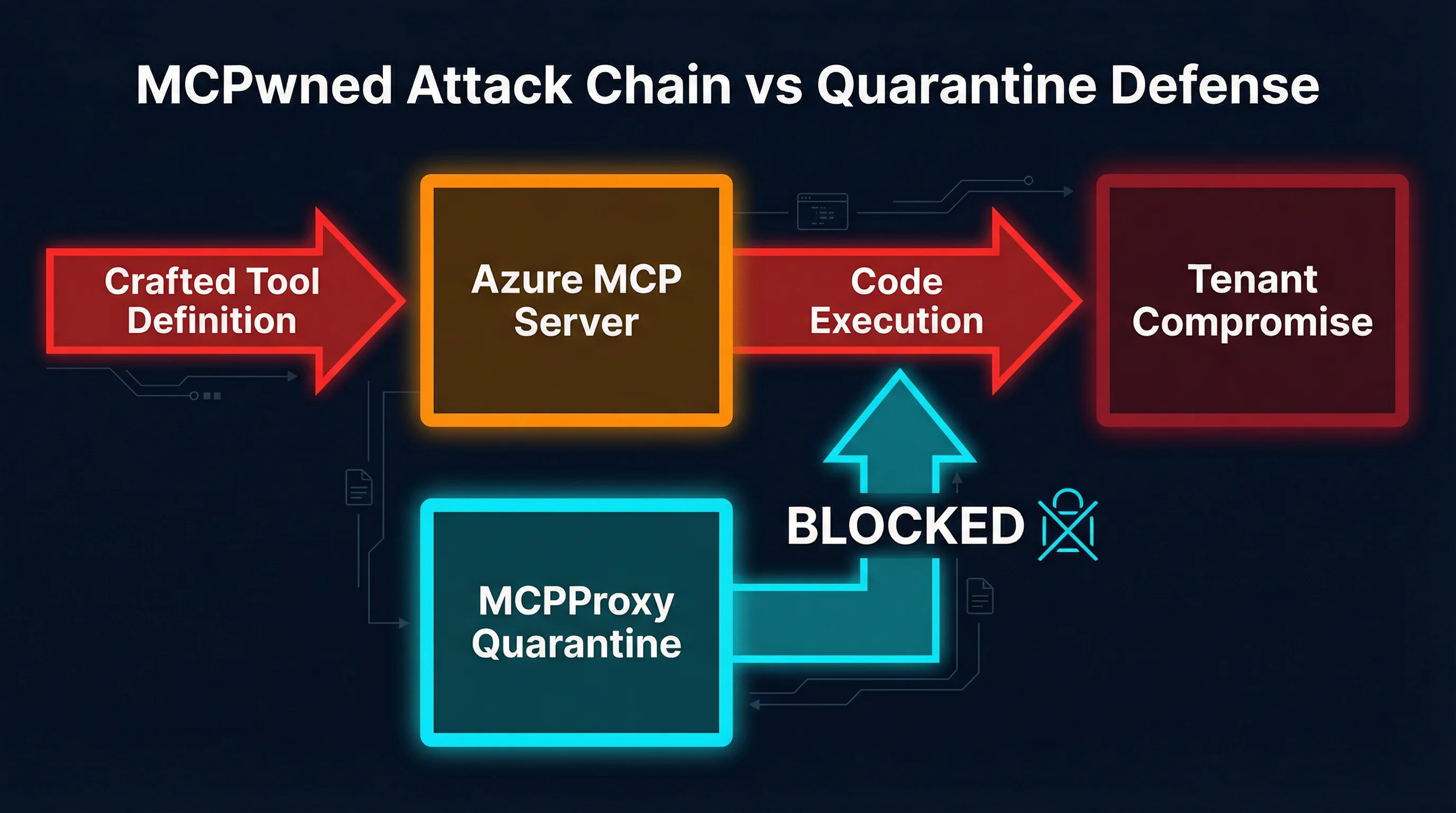
Stage 1: Crafted Tool Definition
The attacker creates a malicious MCP tool definition that appears legitimate on the surface. The tool’s name, description, and declared parameters all look normal — perhaps a tool for “listing Azure resource groups” or “checking deployment status.” But the tool’s execution payload contains injected commands hidden within parameter handling logic.
This is not prompt injection. The payload is not in natural language designed to confuse an LLM. It is actual executable code embedded in the tool definition’s implementation, targeting the server-side execution environment.
Stage 2: Azure MCP Server Accepts and Executes
When the poisoned tool reaches Azure MCP Server, the server does what MCP servers do: it registers the tool and makes it available for execution. There is no validation of the tool’s implementation against a known-safe baseline. There is no sandboxing of the execution environment. There is no content inspection of what the tool actually does when invoked.
The MCP specification does not require any of these safeguards. A conformant MCP server is, by specification, a willing executor of whatever tools it is given.
Stage 3: Code Execution and Credential Theft
Once the tool executes, the injected payload runs with the full privileges of the Azure MCP Server process. In Azure’s case, this means access to the service principal credentials that the server uses to manage Azure resources. The researchers demonstrated exfiltration of:
- Service principal client IDs and secrets
- Azure subscription identifiers
- Tenant-level management certificates
- OAuth tokens with broad resource access scopes
The payload also established persistence by writing to the server’s tool registry, ensuring the malicious tool would survive server restarts.
Stage 4: Lateral Movement and Tenant Compromise
With service principal credentials in hand, the attacker pivots from the compromised MCP Server to the broader Azure tenant. The researchers demonstrated:
- Enumeration of all subscriptions accessible to the service principal
- Creation of new privileged service principals for persistent access
- Access to Azure Key Vault secrets across the tenant
- Deployment of additional malicious resources using the stolen credentials
The total time from initial tool submission to full tenant compromise in the live demonstration was under 90 seconds.
Why This Is Not Just an Azure Problem
It is tempting to frame MCPwned as an Azure vulnerability that Microsoft patched and move on. That framing misses the point entirely.
The vulnerability Token Security exploited is not a bug in Azure’s implementation. It is a feature of MCP’s architecture. The protocol assumes that tools are trusted. There is no built-in mechanism for:
- Tool provenance verification. MCP does not define how to verify that a tool comes from a legitimate source. Any client can register any tool with any server.
- Execution sandboxing. The protocol does not specify isolation boundaries for tool execution. Tools run in whatever environment the server provides, typically with the server’s own privileges.
- Output inspection. MCP does not define content security policies for tool outputs. A tool can return anything — including instructions for the LLM to execute further malicious actions.
- Behavioral baseline enforcement. There is no concept of “this tool should only read data” versus “this tool can write” at the protocol level. A tool that claims to list resources can silently modify them.
Every MCP deployment shares these properties. If you are running an MCP server that accepts tools from external sources — or even from internal sources that could be compromised — you have the same class of vulnerability that Token Security demonstrated against Azure.
The attack surface scales with the number of MCP servers and tools in your environment. A typical enterprise MCP deployment might have 20-50 upstream servers providing hundreds of tools. Each tool is a potential entry point for a MCPwned-class attack. Each server is a potential lateral movement target.
The Supply Chain Dimension
MCPwned also highlights a supply chain risk that the MCP ecosystem has not adequately addressed. MCP tool registries and servers are proliferating rapidly. Developers add upstream MCP servers the way they add npm packages — often without reviewing what the tools actually do. A compromised or malicious MCP server in a public registry could distribute poisoned tools to thousands of downstream deployments.
This is not hypothetical. The same patterns that led to supply chain attacks in npm, PyPI, and Docker Hub apply directly to MCP tool registries. The difference is that MCP tools execute with the privileges of the server, not in a constrained package runtime.
Gateway-Level Defense: Why Quarantine-First Matters
Patching individual vulnerabilities is necessary but insufficient. The MCPwned attack class will recur because the underlying trust model has not changed. Defense requires a fundamentally different approach: treat every tool as untrusted until explicitly verified.
This is the architectural principle behind MCPProxy’s quarantine-first model. Instead of trusting tools by default and trying to detect malicious ones, MCPProxy inverts the assumption: every new tool is quarantined and blocked from execution until a human operator explicitly approves it.
How Quarantine Blocks the MCPwned Chain
Consider the MCPwned attack chain against a deployment protected by MCPProxy:
- Crafted tool definition arrives. MCPProxy intercepts the tool registration before it reaches any downstream MCP server.
- Quarantine triggers. The tool is flagged as new/unreviewed and placed in quarantine. It is visible in the MCPProxy dashboard but cannot be executed.
- Human review. An operator examines the tool’s definition, parameters, and implementation. The injected payload is visible during review.
- Tool is rejected. The attack chain never progresses past stage 1.
The critical insight is that quarantine does not require detecting the specific exploit. It does not need signatures, heuristics, or ML-based malware detection. It simply requires that new tools cannot execute until a human has reviewed them. This defends against zero-day exploits, novel attack techniques, and supply chain compromises equally.
Docker Isolation: Defense in Depth
Quarantine is the first line of defense, but defense in depth requires assuming that approved tools might later be compromised. MCPProxy addresses this with Docker-based tool isolation:
- Each upstream MCP server runs in its own Docker container with a minimal filesystem
- Network access is restricted to only the endpoints the tool legitimately needs
- Tools cannot access other tools’ containers or the host filesystem
- Resource limits (CPU, memory, execution time) prevent denial-of-service
Even if a tool passes review and is later compromised through an upstream supply chain attack, Docker isolation contains the blast radius to a single container. The attacker cannot pivot to other MCP servers, access credentials for other services, or reach the host system.
Output Inspection
MCPProxy also inspects tool outputs before they reach the LLM. This addresses a secondary attack vector that MCPwned hinted at but did not fully explore: using tool outputs to inject instructions into the LLM’s context. Output inspection scans for:
- Credential-like patterns (API keys, tokens, connection strings)
- Prompt injection attempts in tool responses
- Unexpected data exfiltration indicators
- Responses that do not match the tool’s declared output schema
Practical: Securing Your MCP Deployment
Whether you use MCPProxy or build your own defenses, here are concrete steps to protect against MCPwned-class attacks.
1. Install MCPProxy as Your MCP Gateway
go install github.com/smart-mcp-proxy/mcpproxy-go/cmd/mcpproxy@latestStart the proxy:
mcpproxy serveAdd your upstream MCP servers:
mcpproxy upstream add --name azure-mcp --url https://your-azure-mcp-server
mcpproxy upstream list
New tools from any upstream are quarantined by default. Review and approve them:
mcpproxy upstream approve --name azure-mcp --tool list-resource-groups2. Audit Your Existing Tool Inventory
Before adding quarantine, you need to understand what is already running. Enumerate every MCP server in your environment and every tool it provides. Check for:
- Tools you do not recognize or did not explicitly add
- Tools with overly broad descriptions (“general purpose utility,” “helper tool”)
- Tools whose implementation you cannot inspect
- Tools from servers that auto-update without your review
3. Enable Docker Isolation for Sensitive Upstreams
Any MCP server that has access to cloud credentials, production databases, or internal APIs should run in Docker isolation. The overhead is minimal — each container uses 50-100 MB of memory — but the security improvement is substantial.
4. Implement Network Segmentation
MCP servers should not have unrestricted network access. Each server should only reach the specific APIs and endpoints it legitimately needs. Block all other egress. This prevents a compromised tool from exfiltrating data to arbitrary external endpoints.
5. Monitor Tool Registration Events
Set up alerting for new tool registrations, changes to existing tool definitions, and tools that are invoked but fail. A sudden influx of new tools from a previously stable upstream, or modifications to existing tool definitions, are strong indicators of compromise.
6. Pin Tool Versions
Do not allow MCP servers to silently update tool definitions. Pin specific versions and review changes through the same approval process used for initial tool registration. Tool definition changes are functionally equivalent to new code deployments and should be treated with the same rigor.
The Bigger Picture
MCPwned is a watershed moment for MCP security. It demonstrated, on stage at the industry’s largest security conference, that the protocol’s trust model is fundamentally broken for production deployments. The response cannot be limited to patching individual servers. It requires rethinking how MCP deployments handle trust.
The good news is that the defense is not complicated. Quarantine-first tool management, execution isolation, and output inspection are well-understood security patterns. They just have not been the default in MCP tooling — until now.
The MCP ecosystem is at an inflection point. The protocol is powerful, the developer experience is excellent, and the tooling ecosystem is growing explosively. But without security gateways that enforce trust boundaries, every MCP deployment is one poisoned tool definition away from a MCPwned-class compromise.
Do not wait for your own RSAC moment. Quarantine your tools today.
MCPProxy is open source. Try it: github.com/smart-mcp-proxy/mcpproxy-go