 MCPProxy
Google Cloud Just Made MCP Default — Here Is What You Need
TL;DR
Google Cloud just flipped a switch that changes the MCP landscape overnight. Fully-managed remote MCP servers are now enabled by default across every Google Cloud service — BigQuery, Cloud Storage, Pub/Sub, Cloud Run, Vertex AI, Spanner, all of it. Not a preview. Not a beta. Not an opt-in flag buried in a settings page. Default-on, production-grade MCP access for every Google Cloud customer. This means every AI agent in your organization can now discover and invoke Google Cloud tools through the Model Context Protocol. The question is no longer “should we adopt MCP?” — it is “who governs what your agents can do with it?”
What Happened
On March 22, 2026, Google Cloud announced that fully-managed remote MCP servers are now available as a default feature across all Google Cloud services. The announcement came without the usual beta-to-GA graduation ceremony. No waitlist, no feature flag, no per-project enablement. If you have a Google Cloud project, your AI agents can now connect to MCP endpoints for every service in the Google Cloud portfolio.
The scope is staggering. BigQuery exposes MCP tools for running queries, listing datasets, describing table schemas, and managing jobs. Cloud Storage provides tools for listing buckets, reading objects, managing ACLs, and configuring lifecycle policies. Pub/Sub offers tools for publishing messages, managing subscriptions, and pulling messages. Cloud Run exposes deployment, scaling, and service management tools. Vertex AI surfaces model management, endpoint deployment, and batch prediction tools. And this is just the surface — every Google Cloud API that previously lived behind REST or gRPC now has a parallel MCP interface.
Each service’s MCP server is fully managed by Google. You do not need to deploy anything. You do not need to configure a sidecar or install an agent. The MCP endpoints are available at well-known URLs, authenticated through Google Cloud’s existing IAM system, and integrated with Cloud Audit Logs. Google has effectively built MCP into the fabric of its cloud platform.
This is not a developer preview for building chatbot prototypes. This is infrastructure-grade MCP, backed by the same SLAs as the underlying Google Cloud services. When BigQuery’s MCP server tells your agent it can run a query, it is running against your production data warehouse with your production credentials.
Why This Changes Everything
The significance of Google’s move is not technical — it is strategic. Three things happened simultaneously that shift the MCP adoption curve from “interesting experiment” to “enterprise default.”
First, the world’s second-largest cloud provider just validated MCP as infrastructure-grade protocol. When AWS or Google Cloud adopt a protocol, it graduates from “promising standard” to “thing your compliance team needs to understand.” Google did not build a demo. They built fully-managed MCP servers with IAM integration, audit logging, and production SLAs. That is a signal to every enterprise CTO that MCP is not going away — it is becoming part of the cloud infrastructure stack, as fundamental as REST APIs.
Second, the default-on posture eliminates the adoption friction. Previous MCP deployments required intentional setup: install a server, configure endpoints, manage transport. Google removed all of that. The MCP endpoints exist whether you want them or not. Every Google Cloud customer is now an MCP customer. This changes the conversation from “should we pilot MCP?” to “we already have MCP — how do we manage it?”
Third, the breadth of services creates a combinatorial explosion of agent capabilities. A single MCP server exposing three tools is manageable. Google Cloud’s MCP surface exposes hundreds of tools across dozens of services. An AI agent connected to Google Cloud MCP can theoretically query your data warehouse, read your storage buckets, publish messages to your event streams, deploy containers to your runtime, and manage your ML models — all in a single session. The attack surface is not additive; it is multiplicative.
This is not theoretical. If your organization uses Google Cloud and has AI agents (and by March 2026, most do), those agents can now discover these MCP endpoints through standard protocol negotiation. The question is whether they will discover them through a governance layer that you control, or through direct connections that you do not.
The Governance Gap
Google’s MCP implementation is technically excellent. IAM integration means tool calls are authenticated. Cloud Audit Logs means invocations are recorded. Per-service tool schemas are well-documented and versioned. If your concern is “can Google Cloud MCP servers do their job correctly?” — the answer is yes.
But that is not the right question.
The right question is: who governs the space between your AI agents and Google’s MCP endpoints?
Google’s IAM answers “can this service account access BigQuery?” It does not answer “should this particular agent, running this particular task, be allowed to query this particular dataset at this particular time?” Google’s model is identity-based access control applied at the service level. What MCP governance requires is intent-based access control applied at the tool level.
Consider a concrete scenario. You have three AI agents in your organization:
- Agent A is a customer support agent that needs to look up order data in BigQuery.
- Agent B is a DevOps agent that manages Cloud Run deployments.
- Agent C is a data science agent that runs exploratory queries across your data warehouse.
With Google Cloud’s default MCP, all three agents can discover all available tools from all Google Cloud services. Agent A — your customer support bot — can see tools for deploying containers to Cloud Run. Agent B — your DevOps agent — can see tools for querying customer PII in BigQuery. Agent C — your data science agent — can see tools for publishing messages to Pub/Sub topics that trigger production workflows.
Google’s IAM might prevent the actual execution if the service accounts are properly scoped. But the agents still discover the tools. They still see the schemas. They still factor those tools into their planning. And in the messy reality of enterprise IAM, service accounts are often over-provisioned, shared across agents, or granted broad roles during initial setup and never tightened.
This is the governance gap: Google governs the tools. Nobody governs the agents.
The gap gets wider when you consider that Google Cloud MCP is not the only MCP surface in your environment. Most enterprises also run internal MCP servers — for databases, internal APIs, file systems, CI/CD pipelines. And they connect to third-party MCP servers — for SaaS tools, external data providers, partner APIs. An agent that discovers Google Cloud MCP tools also discovers internal tools. The governance question is not just about Google’s tools in isolation; it is about the entire tool surface that your agents can see and invoke.
What You Actually Need
Closing the governance gap requires four capabilities that sit between your agents and Google Cloud’s MCP endpoints.
Per-Agent Authentication and Authorization
Every agent that connects to Google Cloud MCP should do so through a gateway that enforces agent-level identity. Not just “this service account can access BigQuery” — but “Agent A can access BigQuery read tools, Agent B can access Cloud Run deployment tools, and Agent C can access BigQuery with specific dataset restrictions.”
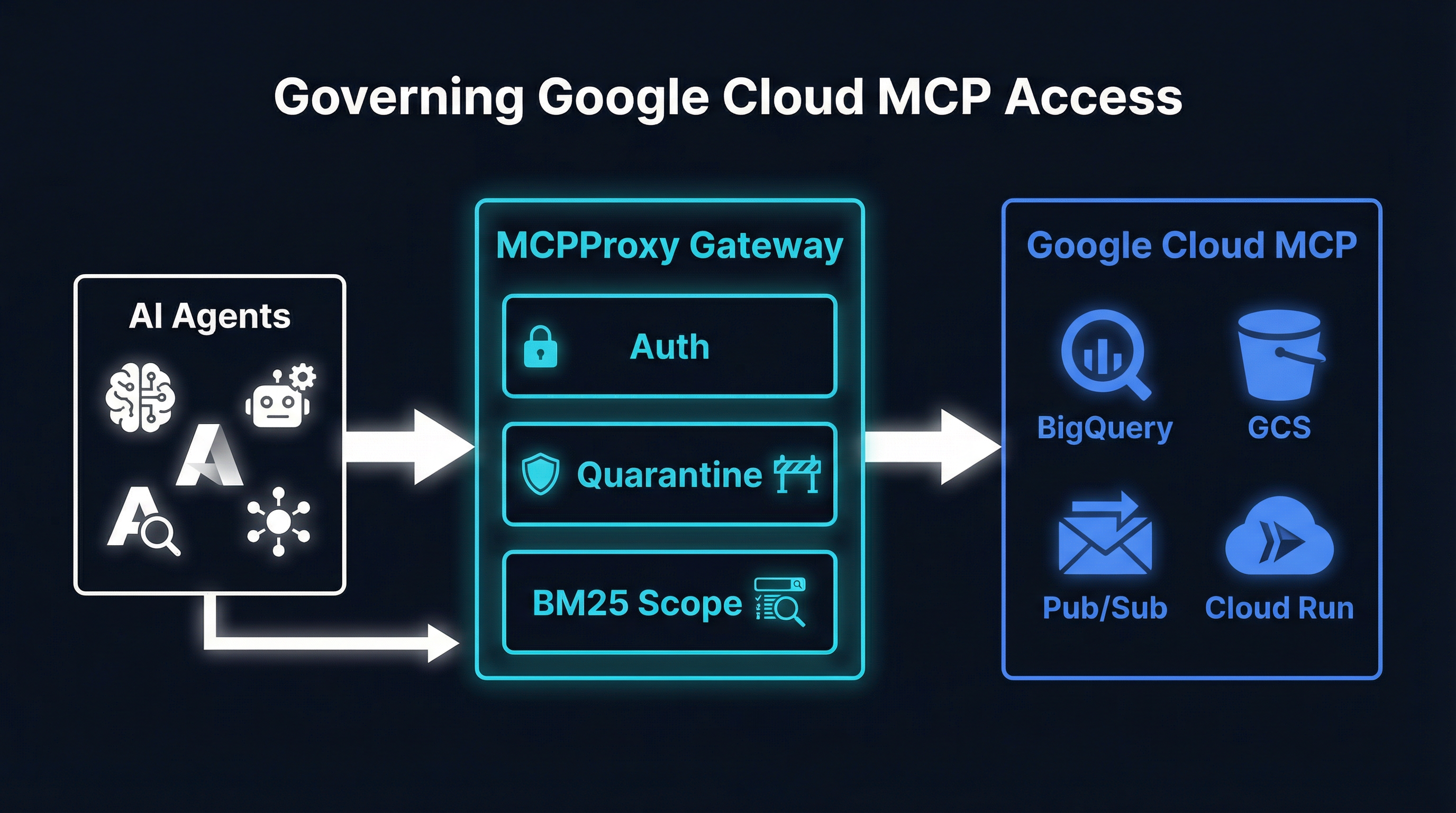
MCPProxy implements this through its OAuth-based agent authentication. Each agent authenticates to MCPProxy with its own identity, and MCPProxy applies per-agent policies before proxying tool calls to Google Cloud’s MCP endpoints. The agent never connects to Google Cloud MCP directly — it connects to MCPProxy, which enforces your governance policies and then forwards authorized calls using appropriately scoped Google Cloud credentials.
# Install MCPProxy
go install github.com/smart-mcp-proxy/mcpproxy-go/cmd/mcpproxy@latest

# Add Google Cloud MCP as an upstream
mcpproxy upstream add google-cloud-bigquery \
  --url "https://mcp.googleapis.com/v1/bigquery" \
  --auth-header "Bearer $(gcloud auth print-access-token)"

mcpproxy upstream add google-cloud-cloudrun \
  --url "https://mcp.googleapis.com/v1/run" \
  --auth-header "Bearer $(gcloud auth print-access-token)"

mcpproxy upstream add google-cloud-gcs \
  --url "https://mcp.googleapis.com/v1/storage" \
  --auth-header "Bearer $(gcloud auth print-access-token)"
Quarantine by Default
When Google enables a new service’s MCP endpoint or adds new tools to an existing service, your agents should not automatically gain access to those tools. MCPProxy’s quarantine model treats every newly discovered tool as untrusted until explicitly approved.
This is the opposite of Google’s default-on posture, and that is the point. Google’s job is to make tools available. Your job is to decide which tools your agents can actually use. Quarantine by default means that when Google adds a new BigQuery tool — say, bigquery.table.delete — it lands in MCPProxy’s quarantine queue. A human reviewer sees it, evaluates whether any agent should have access to a table-deletion tool, and approves or rejects it.
# List quarantined tools from Google Cloud upstream
mcpproxy upstream list --quarantined

# Approve specific tools for specific agent groups
mcpproxy upstream approve google-cloud-bigquery \
  --tool "bigquery.query.execute" \
  --tool "bigquery.datasets.list" \
  --tool "bigquery.tables.describe"
Without quarantine, the default-on nature of Google Cloud MCP means your tool surface grows every time Google ships an update. With quarantine, your tool surface grows only when you deliberately expand it.
BM25 Tool Scoping
Google Cloud’s MCP surface exposes hundreds of tools. An agent performing a customer support task does not need to see deployment tools, IAM management tools, or billing tools. Exposing irrelevant tools wastes the agent’s context window, increases the chance of the agent selecting a wrong tool, and expands the attack surface unnecessarily.
MCPProxy’s BM25 tool scoping limits which tools each agent sees based on relevance to the agent’s task. When Agent A asks MCPProxy for available tools, BM25 ranks BigQuery query and read tools highly and suppresses Cloud Run deployment tools entirely. The agent never learns those tools exist. This is not just a performance optimization — it is a security boundary. An agent cannot invoke a tool it does not know about.
# Agent A only sees BigQuery read tools
# BM25 scoping is automatic based on agent's query context
# Agent connects to MCPProxy, which returns only relevant tools:
#   - bigquery.query.execute
#   - bigquery.datasets.list
#   - bigquery.tables.describe
#   - bigquery.jobs.get
#
# Agent B only sees Cloud Run tools:
#   - run.services.deploy
#   - run.services.list
#   - run.revisions.get
BM25 operates on tool names, descriptions, and parameter schemas. It does not require embeddings, vector databases, or GPU inference. It runs in microseconds, scales to thousands of tools, and produces deterministic results. When your Google Cloud MCP surface grows from fifty tools to five hundred, BM25 ensures each agent still sees only the ten or twenty tools relevant to its task.
Docker Isolation for Untrusted Servers
Google Cloud’s managed MCP servers are trustworthy — Google runs the infrastructure, signs the responses, and backs them with SLAs. But your MCP environment is not just Google. You likely also connect to community MCP servers, partner-provided tools, and internally developed servers of varying maturity.
MCPProxy’s Docker isolation lets you run untrusted MCP servers in sandboxed containers with restricted network access, read-only file systems, and resource limits. Google Cloud’s MCP servers do not need this treatment (they run on Google’s infrastructure, not yours), but the principle matters: a governance layer should let you apply different trust levels to different upstream servers.
# Google Cloud MCP — trusted, direct proxy
mcpproxy upstream add google-cloud-bigquery \
  --url "https://mcp.googleapis.com/v1/bigquery" \
  --trust-level trusted

# Community MCP server — untrusted, Docker isolated
mcpproxy upstream add community-slack-tools \
  --docker-image "mcp-servers/slack:latest" \
  --trust-level quarantined \
  --network none \
  --memory 256m
Putting It Together: MCPProxy in Front of Google Cloud MCP
Here is the practical architecture. Your AI agents connect to MCPProxy. MCPProxy enforces per-agent auth, quarantine policies, and BM25 scoping. Approved tool calls are forwarded to Google Cloud’s MCP endpoints (and any other upstream MCP servers you have configured). Responses flow back through MCPProxy, which logs everything and enforces response policies.
The setup takes about ten minutes:
# 1. Install MCPProxy
go install github.com/smart-mcp-proxy/mcpproxy-go/cmd/mcpproxy@latest

# 2. Add Google Cloud MCP endpoints as upstreams
mcpproxy upstream add gcp-bigquery \
  --url "https://mcp.googleapis.com/v1/bigquery" \
  --auth-header "Bearer $(gcloud auth print-access-token)"

mcpproxy upstream add gcp-storage \
  --url "https://mcp.googleapis.com/v1/storage" \
  --auth-header "Bearer $(gcloud auth print-access-token)"

mcpproxy upstream add gcp-pubsub \
  --url "https://mcp.googleapis.com/v1/pubsub" \
  --auth-header "Bearer $(gcloud auth print-access-token)"

mcpproxy upstream add gcp-cloudrun \
  --url "https://mcp.googleapis.com/v1/run" \
  --auth-header "Bearer $(gcloud auth print-access-token)"

# 3. Review and approve tools from quarantine
mcpproxy upstream list --quarantined
mcpproxy upstream approve gcp-bigquery --tool "bigquery.query.execute"
mcpproxy upstream approve gcp-bigquery --tool "bigquery.datasets.list"
mcpproxy upstream approve gcp-storage --tool "storage.objects.get"
mcpproxy upstream approve gcp-storage --tool "storage.buckets.list"

# 4. Start the gateway
mcpproxy serve --port 8080

# 5. Point your agents at MCPProxy instead of Google Cloud MCP
# Agent config:
# mcp_endpoint: http://localhost:8080/mcp
That is it. Your agents now access Google Cloud MCP through a governance layer that you control. New tools from Google land in quarantine. Each agent sees only the tools relevant to its task. Every tool call is logged with agent identity, tool name, parameters, and response. You have audit trails that Google Cloud Audit Logs alone cannot provide because they lack agent-level attribution.
The Bigger Picture
Google making MCP default-on is not an isolated event. It is part of a pattern. Anthropic standardized the protocol. OpenAI adopted it. AWS added MCP support to Bedrock. And now Google Cloud has made it a first-class infrastructure primitive. The MCP wave is not coming — it arrived.
What Google’s move makes urgent is the governance question. When MCP was opt-in and experimental, you could treat governance as a future problem. When MCP is default-on across your cloud provider and your agents are already discovering hundreds of production tools, governance becomes a today problem.
The organizations that will navigate this well are the ones that insert a governance layer now — before their agents start discovering tools they should not have access to, before an over-provisioned service account leads to a data exposure, before the combinatorial explosion of agent capabilities meets the reality of enterprise compliance requirements.
MCPProxy exists precisely for this moment. It is open source, purpose-built for MCP governance, and designed to sit transparently between agents and the MCP servers they consume — whether those servers are managed by Google Cloud, deployed internally, or provided by third parties.
Google just made MCP default. Make governance default too.
GitHub: github.com/smart-mcp-proxy/mcpproxy-go
go install github.com/smart-mcp-proxy/mcpproxy-go/cmd/mcpproxy@latest