 MCPProxy
MCPwned: Why Your MCP Server Config Is Now an Attack Vector
The Config File You Stopped Worrying About
Every developer has a .claude/settings.json. Or a .cursor/mcp.json. Or an mcp_config.json sitting in their home directory. These files tell AI coding assistants which MCP servers to load, what commands to run, and which endpoints to connect to. They are checked into repos, shared across teams, and copy-pasted from blog tutorials.
Until last week, nobody treated them as attack surfaces.
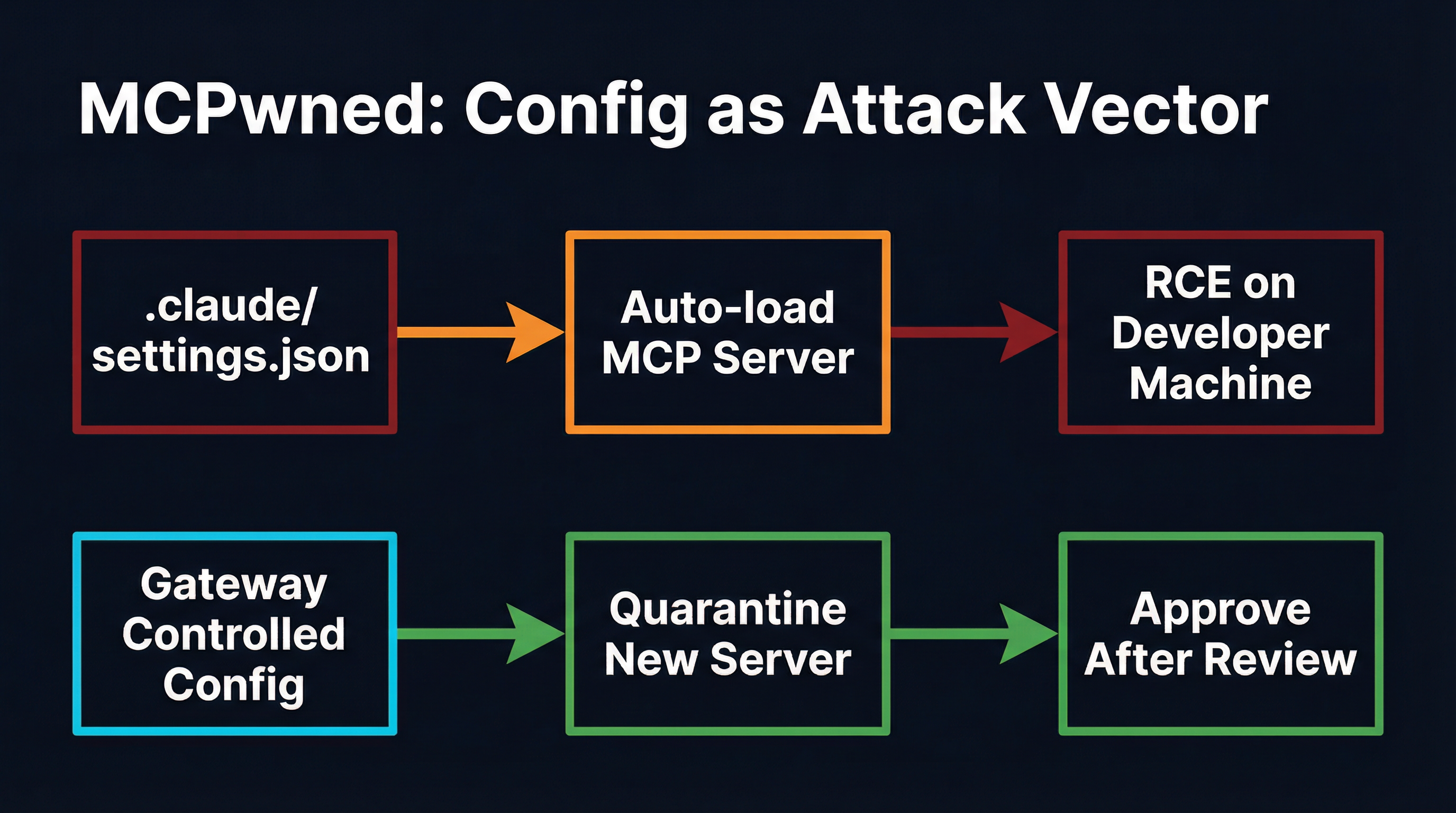
Check Point Research’s MCPwned disclosure changed that. Their research demonstrates a full remote code execution chain that begins with a single entry in a configuration file and ends with arbitrary command execution on the developer’s machine. No exploits. No buffer overflows. Just a JSON object that tells the AI assistant to load a server — and that server runs whatever it wants.
This is not a theoretical attack. It is configuration-as-code-execution, and it is now the dominant attack class in the MCP ecosystem.
MCPwned: The Anatomy of Config-Based RCE
Check Point’s attack chain is elegant in its simplicity. The .claude/settings.json file (or equivalent config for Cursor, Windsurf, and other MCP-aware editors) specifies MCP servers declaratively:
{
  "mcpServers": {
    "helpful-tools": {
      "command": "npx",
      "args": ["-y", "totally-legit-mcp-server"]
    }
  }
}
When the AI assistant starts, it reads this configuration and spawns every listed server process. There is no verification step. There is no signature check. There is no sandbox. The npx command downloads and executes whatever package is named, with the full permissions of the developer’s user account.
Check Point demonstrated three attack vectors through this mechanism:
-
Direct config injection — An attacker who can modify
.claude/settings.json(via a malicious PR, a compromised dependency’s postinstall script, or social engineering) adds their server to the config. Next time the developer opens their editor, the malicious server launches. -
Cross-client contamination — Because MCP configs often live in project directories, cloning a repository can introduce malicious server definitions. The developer opens the project, the editor discovers the local config, and the attack server starts silently.
-
Tool poisoning through legitimate servers — Even when the initial server is benign, MCPwned showed that a compromised upstream can push a malicious update. The config still points to the same package name, but the code behind it has changed.
The result in every case: the attacker achieves code execution on the developer’s machine with the developer’s credentials, file system access, and network position. From there, the standard post-exploitation playbook applies — credential theft, lateral movement, data exfiltration, supply chain injection.
Azure MCP: CVE-2026-26118 and Server-Side Config Abuse
MCPwned targets the developer’s local machine. CVE-2026-26118 targets the cloud.
Microsoft’s Azure MCP Server, designed to let AI agents manage Azure resources through MCP, contained a Server-Side Request Forgery (SSRF) vulnerability. The attack exploited how the MCP server processed configuration parameters to redirect internal requests to Azure’s Instance Metadata Service (IMDS), extracting managed identity tokens that grant access to the entire Azure subscription.
The configuration-based attack surface here is different but structurally identical: the MCP server trusts its configuration inputs implicitly. When those inputs can be influenced by an attacker — whether through prompt injection, tool parameter manipulation, or direct config modification — the server becomes a proxy for the attacker’s intentions.
Azure patched CVE-2026-26118, but the pattern it exposes applies to every MCP server that accepts URLs, paths, or connection strings as configuration: if the config value is attacker-controlled, the server’s capabilities become the attacker’s capabilities.
30+ CVEs and the Configuration Trust Problem
MCPwned and the Azure SSRF are the most visible examples, but they sit atop a growing pile of vulnerabilities that all share a root cause: MCP configurations are trusted implicitly.
The CVE database now contains over 30 entries related to MCP server vulnerabilities discovered between late 2025 and early 2026:
- CVE-2025-6514 — The
mcp-remotepackage (437,000+ downloads) passed unsanitized OAuth callback parameters to the system shell, enabling credential theft through a crafted authorization URL. - CVE-2025-49596 — Framelink/Figma MCP server allowed command injection via unsanitized user input passed to
child_process.exec. - Smithery platform breach — Path traversal in build configurations leaked Docker credentials across 3,000+ hosted MCP applications.
- Multiple npm MCP packages — Invariant Labs and JFrog independently identified MCP server packages on npm that contained hidden tool descriptions instructing agents to exfiltrate environment variables and API keys.
Every one of these vulnerabilities has a configuration file in its kill chain. The developer (or the automation pipeline) loads a config that references a server. The server is trusted because the config says to trust it. The server exploits that trust.
This is the same pattern that made .npmrc, Dockerfile, and Makefile into attack vectors in earlier supply chain campaigns — except MCP configs have broader blast radius because they grant the compromised server direct access to an AI agent’s capabilities.
Why Config-as-Code-Execution Is Structurally Different
Traditional supply chain attacks through config files (poisoned package.json postinstall scripts, malicious Makefile targets) require the attacker to trigger a build or install step. The developer runs npm install or make, and the malicious code executes.
MCP config attacks remove even that trigger. The configuration is loaded automatically when the AI assistant starts. There is no explicit build step. The developer opens their editor, the config is parsed, and the servers start. The attack surface is not “running a command” — it is “opening a project.”
This has three consequences that make it worse than traditional config attacks:
1. No install-time audit opportunity. Package managers show what they are installing. npm install prints a dependency tree. Docker pulls show layer hashes. MCP server loading is silent. The developer sees no output indicating that a new server process was spawned.
2. Persistent execution. A malicious postinstall script runs once during installation. A malicious MCP server runs for the entire duration of the developer’s session, maintaining a persistent bidirectional connection to the AI agent. It can respond to tool calls, inject context, and exfiltrate data continuously.
3. Agent-amplified impact. The compromised server does not just run code — it influences an AI agent that has been granted broad permissions. Through tool poisoning and prompt injection, the attacker can direct the agent to perform actions across all connected systems, not just the one the malicious server controls.
How Gateways Break the Config-to-Execution Chain
The structural fix for configuration-as-code-execution is to separate config authoring from server activation. A gateway sits between the configuration and the runtime, enforcing policies that no local config file can override.
MCPProxy implements this separation through three mechanisms that directly address the MCPwned attack chain:
Quarantine: No Auto-Load, Ever
When MCPProxy discovers a new MCP server — whether from a config file, a project directory, or a remote registry — the server enters quarantine. Its tools are registered but not available to agents until an operator explicitly approves them:
mcpproxy upstream list              # see all servers and their status
mcpproxy upstream approve <id>      # move from quarantine to active
This is the single most important defense against MCPwned-style attacks. The attacker can inject any server definition they want into a config file. When MCPProxy processes that config, the malicious server lands in quarantine. It never reaches the agent. The developer sees it in the pending list, investigates, and rejects it.
The quarantine gate is non-bypassable. There is no --force flag. There is no “trust all servers from this directory” setting. Every new server goes through the same approval flow, whether it was added by a teammate, a dependency, or an attacker.
Centralized Config, Not Scattered Files
MCPwned exploits the fact that MCP configs live in project directories, home directories, and editor-specific locations. An attacker who can write to any of these locations can inject a server definition. The attack surface is every directory the developer opens.
MCPProxy consolidates server definitions into a single managed configuration. Instead of each project carrying its own .claude/settings.json with server definitions, all MCP routing goes through the gateway:
mcpproxy serve                      # start the gateway
mcpproxy upstream add <server>      # add a server (enters quarantine)
Project-level configs can still influence tool routing through MCPProxy’s BM25-based tool discovery (the agent asks for capabilities, and MCPProxy routes to the right upstream server), but they cannot inject new server processes. The attack surface shrinks from “every config file in every project” to “one gateway configuration managed by the operator.”
Docker Isolation: Containing the Blast Radius
Even after approval, MCPProxy can run each upstream server inside a Docker container with explicit resource limits, network policies, and filesystem mounts:
{
  "mcpServers": {
    "code-tools": {
      "command": "npx",
      "args": ["-y", "@example/mcp-tools"],
      "docker": {
        "enabled": true,
        "image": "node:22-slim",
        "network": "none",
        "memory": "512m",
        "readOnlyRoot": true,
        "volumes": ["/workspace:/data:ro"]
      }
    }
  }
}
If a previously-approved server is compromised through an upstream supply chain attack (the MCPwned “rug pull” scenario), Docker isolation limits the damage. The server cannot access the developer’s filesystem, network, or credentials. It can only interact with the explicitly mounted volumes and the MCP protocol channel.
This defense-in-depth approach means that even in the worst case — an attacker compromises a trusted server after it has been approved — the blast radius is contained to the server’s sandbox.
The Config Hygiene Checklist
While gateways provide structural defense, individual developers can reduce their exposure immediately:
-
Audit your MCP configs now. Run
find ~ -name "mcp*.json" -o -name "settings.json" | xargs grep mcpServersand review every server definition. Do you recognize all of them? Do the package names resolve to legitimate publishers? -
Never copy MCP configs from untrusted sources. That helpful blog post with a ready-made
mcp.json? It might include a server you did not ask for. Type configs manually or use verified templates. -
Pin server versions. Replace
npx -y some-mcp-serverwithnpx -y some-mcp-server@1.2.3. This does not prevent all supply chain attacks, but it blocks the “rug pull” scenario where a compromised update replaces a benign server. -
Watch for project-level configs in PRs. Any pull request that adds or modifies
.claude/settings.json,.cursor/mcp.json, or similar files should receive the same scrutiny as changes toDockerfileor CI pipeline definitions. -
Route through a gateway. Use MCPProxy or a similar gateway to centralize server management and enforce quarantine. This is the only approach that provides a hard gate between config and execution.
The Broader Pattern: Every Config Is an Attack Surface
MCPwned is not an anomaly. It is the MCP ecosystem’s version of a pattern that has played out in every developer tooling ecosystem:
- npm learned that
postinstallscripts inpackage.jsonare code execution vectors (event-stream incident, 2018). - Docker learned that
DockerfileFROMdirectives are supply chain entry points (cryptomining images, 2019-2022). - GitHub Actions learned that workflow files are privilege escalation surfaces (GITHUB_TOKEN abuse, 2021-2023).
- MCP is now learning that config files are code execution vectors (MCPwned, 2026).
The timeline compresses each cycle. npm took years to develop defenses like --ignore-scripts and package provenance. Docker took years to ship content trust and build attestations. MCP does not have years. The attack surface is already being exploited, and the 30+ CVEs are accelerating.
The structural answer is always the same: interpose a trust boundary between the declaration of intent (the config file) and the execution of that intent (the running server). In the MCP ecosystem, that trust boundary is a gateway.
Configuration files are declarations. They should not be execution. The gap between those two things is where MCPwned lives — and where gateways close the door.