 MCPProxy
BM25 vs Embeddings vs Lua: Comparing Approaches to the MCP Too Many Tools Problem
TL;DR
MCP tool definitions can consume 55,000+ tokens before your agent processes a single user message. With each tool costing 550-1,400 tokens, and real-world setups easily reaching 40-100+ tools across multiple servers, the context window fills up fast. Four fundamentally different approaches have emerged to solve this: MCPProxy’s BM25-based gateway, Speakeasy’s embedding-powered Dynamic Toolsets, my-cool-proxy’s Lua scripting layer, and Claude Code’s built-in Tool Search. Each makes different trade-offs across latency, accuracy, configuration burden, and portability. This post breaks down how they work, when they shine, and when they fall short.
The Problem: Your Tools Are Eating Your Context
The Model Context Protocol promised a universal interface between AI agents and tools. It delivered on that promise — and created a new problem in the process. Every MCP tool definition gets injected into the LLM’s context window as a JSON schema: the tool name, its description, every parameter with types, enums, and constraints. A single tool costs between 550 and 1,400 tokens depending on its complexity.
Connect three MCP servers — say GitHub, Slack, and a database tool — and you are looking at 40+ tools consuming upwards of 55,000 tokens before the agent even sees the user’s question. One documented case hit 143,000 of 200,000 available tokens just from tool definitions — 72% of the context window gone.
The problem compounds at the platform level. Cursor caps tool count at 40. GitHub Copilot stops at 128. Even platforms without hard limits see degraded LLM performance as the tool count climbs: the model struggles to select the right tool from a wall of JSON schemas, and accuracy drops off a cliff.
This is not a theoretical concern. It is the central scaling bottleneck of MCP today.
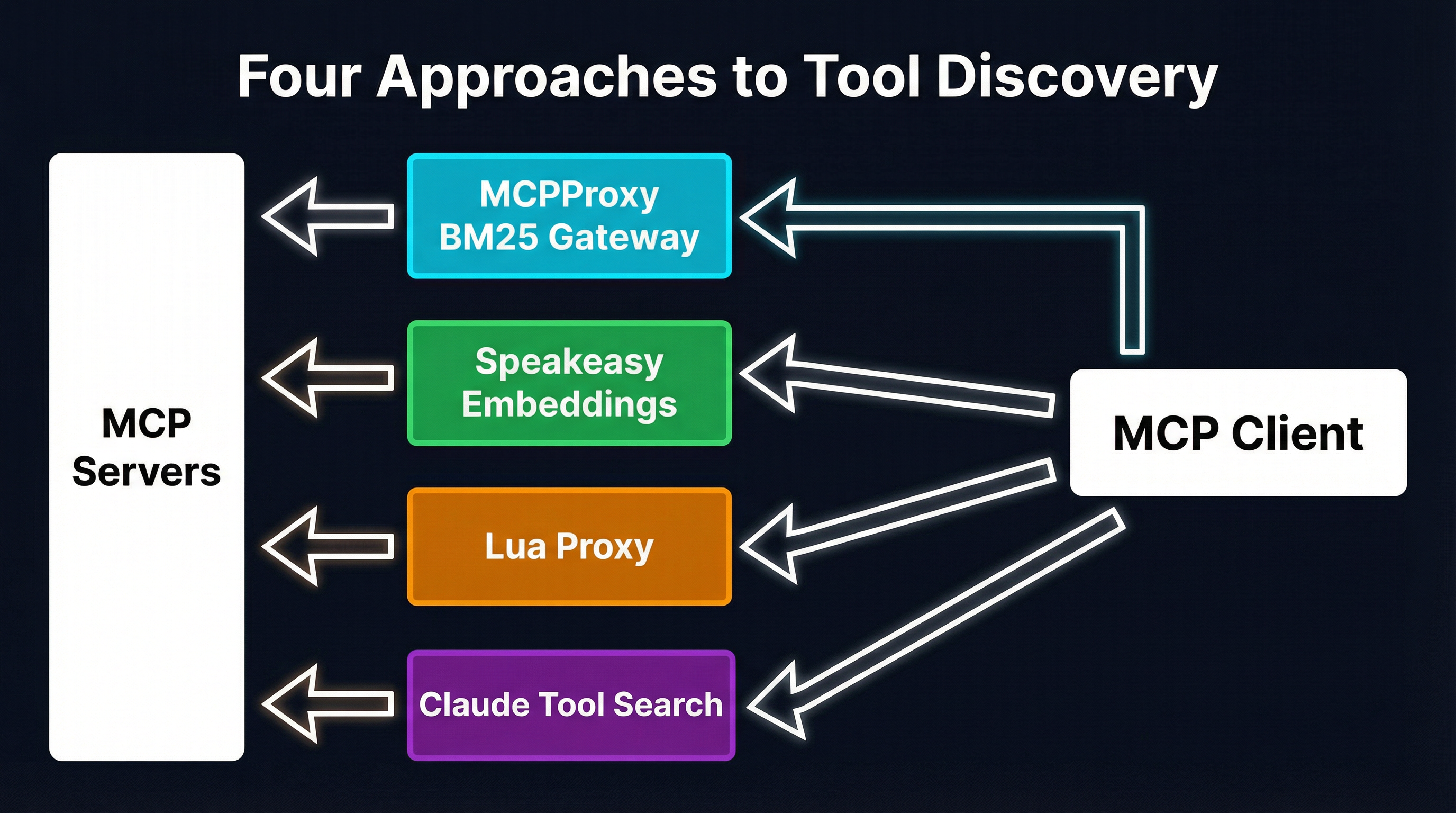
Approach 1: MCPProxy BM25 Gateway
MCPProxy takes the position that tool discovery should be automatic, zero-configuration, and invisible to both the client and the upstream servers. It sits between the MCP client (Claude, Cursor, Copilot, or any other) and any number of upstream MCP servers, acting as a transparent gateway.
How it works
When MCPProxy starts, it connects to all configured upstream servers and indexes every tool’s name, description, and parameter schemas into an in-process BM25 index (backed by Bleve). Instead of forwarding all tools to the client, it exposes a single meta-tool: search_tools. The client sends a natural-language query describing what it needs, MCPProxy runs a BM25 search, and returns only the top-matching tools — typically 5-10 instead of hundreds.
The key insight is that BM25’s term-frequency mechanics align well with how tool names and descriptions are written. A query like “create a GitHub pull request” contains the exact keywords that appear in github_create_pull_request’s definition. No embedding model, no vector database, no external service required.
Setup
go install github.com/smart-mcp-proxy/mcpproxy-go/cmd/mcpproxy@latest

# Add an upstream MCP server
mcpproxy upstream add --name github --url https://github-mcp-server.example.com

# Start the gateway
mcpproxy serve
That is it. No model downloads, no API keys for embedding services, no per-tool configuration. MCPProxy indexes tools automatically as upstream servers connect.
Trade-offs
Strengths: Sub-millisecond search latency. Zero configuration. Works with any MCP client. No external dependencies beyond the Go binary. The BM25 index rebuilds automatically when upstream tools change.
Weaknesses: BM25 is purely lexical — it cannot bridge the semantic gap between “notify the team” and slack_send_message. For small-to-medium tool sets (under 200-300 tools), this rarely matters because tool names are sufficiently descriptive. At larger scale, top-1 accuracy drops. Our earlier analysis showed BM25 hitting 14% top-1 accuracy at 270+ tools, though top-5 remains strong at 87%.
Approach 2: Speakeasy Dynamic Toolsets (Embeddings)
Speakeasy takes a different path: instead of keyword matching, it uses embedding-based semantic search to find relevant tools. Their Dynamic Toolsets system replaces the entire static tool list with three meta-tools: search_tools, describe_tools, and execute_tool.
How it works
When a toolset is configured, Speakeasy generates embeddings for every tool’s name, description, and categorical metadata. At query time, the user’s intent is embedded with the same model, and cosine similarity finds the closest matches. The system also supports tag-based categorical browsing (e.g., source:hubspot) to complement semantic search.
The three-function architecture implements progressive disclosure: search_tools returns tool names and brief descriptions, describe_tools fetches full schemas only for the tools the agent actually wants to use, and execute_tool runs them. This means a 400-tool deployment never sends more than a handful of full schemas to the LLM.
Results
Speakeasy reports input tokens reduced by an average of 96.7% for simple tasks and 91.2% for complex tasks, with overall token consumption dropping by up to 160x compared to static toolsets. They maintain 100% success rate across toolset sizes ranging from 40 to 400 tools.
Trade-offs
Strengths: Semantic understanding bridges vocabulary gaps that BM25 cannot. The 96%+ token reduction is dramatic. Scales gracefully to hundreds of tools without accuracy degradation. Tag-based filtering adds a structured discovery dimension.
Weaknesses: Requires an embedding model — either a hosted API call (adding latency) or a local model (adding deployment complexity). Speakeasy reports 2-3x more tool calls than static approaches due to the search-then-describe-then-execute flow, and roughly 50% slower execution time. The system is tightly coupled to Speakeasy’s platform rather than being a standalone tool.
Approach 3: my-cool-proxy (Lua Scripting)
my-cool-proxy takes the most flexible approach: rather than automating tool discovery, it gives users a full programming language to control exactly what happens. The proxy consolidates multiple MCP servers behind a single gateway and uses Lua as its scripting runtime for tool composition and filtering.
How it works
My-cool-proxy implements progressive disclosure through a different mechanism than search. Instead of exposing all tools upfront, it provides list-servers, list-server-tools, and tool-details meta-tools. The agent discovers available servers, browses their tool catalogs, and retrieves full schemas only for what it needs.
The Lua scripting layer takes this further. Users write Lua scripts that compose multi-step tool workflows into single execute() calls:
local raw_data = api_server.fetch({ id = 123 }):await()
local processed = processor.transform({ input = raw_data }):await()
result(processed)
This collapses what would be multiple agent-tool round trips — each consuming context window space for intermediate results — into a single scripted pipeline. The Lua runtime provides discovered servers as globals, with tools callable as async functions that support conditional logic and loops.
Trade-offs
Strengths: Maximum flexibility. Lua scripts can implement arbitrary filtering logic, multi-step workflows, conditional tool routing, and custom access control. The centralized configuration eliminates the need to duplicate MCP server configs across multiple clients. Tool access can be scoped per-agent for security.
Weaknesses: Someone has to write and maintain the Lua scripts. This is a power-user tool — it trades zero-configuration simplicity for programmable control. There is no automated discovery; the intelligence lives in the scripts, not in a search algorithm. The overhead scales with the number of custom workflows you define.
Approach 4: Claude Code Tool Search (Built-in)
Anthropic’s Claude Code includes a built-in Tool Search mechanism that handles tool overflow natively within the client. When the number of configured tools exceeds a threshold, Claude Code automatically hides some tools and exposes a search function that the agent uses to find what it needs.
How it works
Tool Search operates at the client level. Claude Code detects when the tool count is high enough to degrade performance, partitions tools into “always available” and “searchable” sets, and injects a search tool into the agent’s toolset. The search mechanism — likely combining keyword and semantic signals — runs against Claude’s infrastructure.
The agent uses natural language to describe what it needs, gets back matching tool definitions, and proceeds as normal. From the user’s perspective, it is invisible — the agent handles the search automatically.
Trade-offs
Strengths: Zero configuration, zero setup. Works out of the box for Claude Code users. Deeply integrated with the client, so the search-select-execute flow is optimized for Claude’s behavior.
Weaknesses: Client-specific. This solution only works in Claude Code — it does not help if you are using Cursor, Copilot, Windsurf, or any other MCP client. It is also opaque; you cannot tune the search behavior, set priorities, or control which tools are always available versus searchable. Stacklok’s benchmarks showed their hybrid approach outperforming Anthropic’s tool search at 94% versus lower accuracy, with faster response times (5.75s versus 12-13.5s).
Head-to-Head Comparison
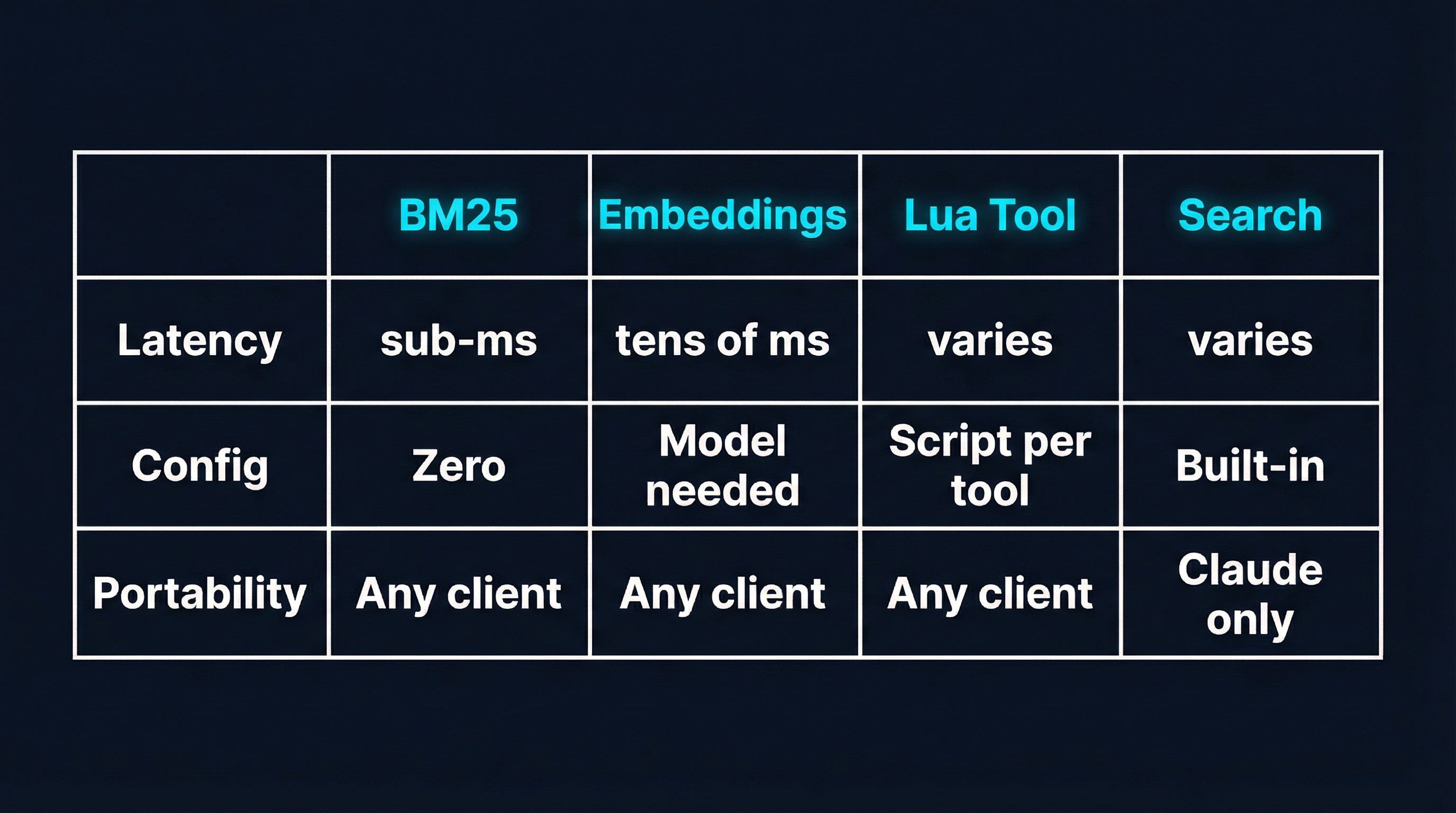
| Dimension | MCPProxy BM25 | Speakeasy Embeddings | my-cool-proxy Lua | Claude Tool Search |
|---|---|---|---|---|
| Search latency | Sub-millisecond | Tens of milliseconds | N/A (manual discovery) | Varies (remote service) |
| Configuration | Zero-config | Dashboard toggle + tags | Lua scripts per workflow | Built-in, no config |
| Portability | Any MCP client | Any MCP client | Any MCP client | Claude Code only |
| Token reduction | 80-95% (top-K tools) | 96%+ (progressive disclosure) | High (scripted pipelines) | Unknown (opaque) |
| Semantic understanding | None (lexical only) | Full (embedding model) | None (manual routing) | Likely yes |
| External dependencies | None (in-process) | Embedding model/API | Lua runtime (bundled) | Anthropic infrastructure |
| Multi-step composition | No | No | Yes (Lua scripts) | No |
| Access control | Quarantine system | Tag-based filtering | Script-level scoping | None |
| Best at 50 tools | Excellent | Overkill | Overkill | Good |
| Best at 500 tools | Needs hybrid | Excellent | Depends on scripts | Good |
When to Use Which
MCPProxy BM25: The Desktop Developer Default
If you are a developer running Claude, Cursor, or Copilot with 5-15 MCP servers and you want the problem to disappear without thinking about it, MCPProxy is the right choice. Install a single binary, point it at your servers, and forget about it. The BM25 search handles the common case — keyword-rich queries against descriptively-named tools — with sub-millisecond latency and no external dependencies.
go install github.com/smart-mcp-proxy/mcpproxy-go/cmd/mcpproxy@latest
mcpproxy upstream add --name github --url https://github-mcp.example.com
mcpproxy upstream add --name slack --url https://slack-mcp.example.com
mcpproxy serve
MCPProxy also provides a quarantine system for security: new tools from upstream servers are quarantined by default and require explicit approval via mcpproxy upstream approve. For deployments approaching 300+ tools where BM25’s lexical limitations start to bite, MCPProxy is evolving toward hybrid BM25+semantic search.
Speakeasy Dynamic Toolsets: The API Platform Play
If you are building a product that exposes hundreds of tools through MCP — a CRM platform, a developer tool suite, an integration layer — Speakeasy’s embedding-based approach makes more sense. The 96% token reduction holds even at 400 tools, and semantic search handles the vocabulary diversity that comes with large API surfaces. The trade-off is platform coupling and the added latency of embedding lookups, but for API-first companies, that is worth it.
my-cool-proxy Lua: The Power User’s Toolkit
If you have complex multi-step workflows that you want to collapse into single operations, or if you need fine-grained access control over which agents can use which tools, my-cool-proxy’s Lua scripting gives you the control that automated approaches cannot. You are trading simplicity for power: every workflow needs a script, but those scripts can encode domain-specific logic that no search algorithm would infer. This is the right tool when your problem is not “finding the right tool” but “orchestrating tools in a specific sequence.”
Claude Tool Search: The Path of Least Resistance
If you exclusively use Claude Code and your tool count is moderate, the built-in Tool Search works without any additional setup. The limitation is portability — the moment you need the same tool set in Cursor or Copilot, you need a different solution. It also does not give you control over tool prioritization or access control.
The Bigger Picture
These four approaches are not really competing — they are solving different facets of the same problem from different positions in the stack.
MCPProxy and my-cool-proxy operate at the gateway layer, sitting between clients and servers. They are protocol-level solutions that work with any MCP client and any MCP server. The difference is automation versus control: MCPProxy automates discovery, my-cool-proxy automates execution.
Speakeasy operates at the platform layer, tightly integrated with how tools are defined and deployed. It is the right approach when you control the tool definitions and can optimize the entire pipeline from definition through discovery to execution.
Claude Tool Search operates at the client layer, solving the problem for one specific client. It is the most convenient when it is available and the most limiting when it is not.
The MCP ecosystem is still young. Today you might pick one of these approaches; in six months, you might be combining them. MCPProxy is already moving toward hybrid BM25+semantic search. Speakeasy is expanding beyond their platform. My-cool-proxy’s Lua layer could sit in front of any of the others. The tool discovery problem is not going away — if anything, it is accelerating as MCP server counts grow. The question is not which approach wins, but which combination gives you the best trade-off for your specific deployment.
Try It
The fastest way to see the difference is to try MCPProxy against your current setup:
go install github.com/smart-mcp-proxy/mcpproxy-go/cmd/mcpproxy@latest
mcpproxy serve
Add your existing MCP servers as upstreams, approve their tools, and watch the token consumption drop. If you hit the BM25 accuracy ceiling with a very large tool set, that is a signal to look at hybrid or embedding-based approaches — but for most developer workstations, BM25’s simplicity and speed are hard to beat.
Links:
- MCPProxy — BM25 gateway, zero-config
- Speakeasy Dynamic Toolsets — Embedding-based progressive disclosure
- my-cool-proxy — Lua-scripted MCP gateway
- Context window analysis — The 55K+ token problem documented