 MCPProxy
We Analyzed the MCP Security Landscape in 2026 — Here's What Every Gateway Needs
The Numbers Are Worse Than You Think
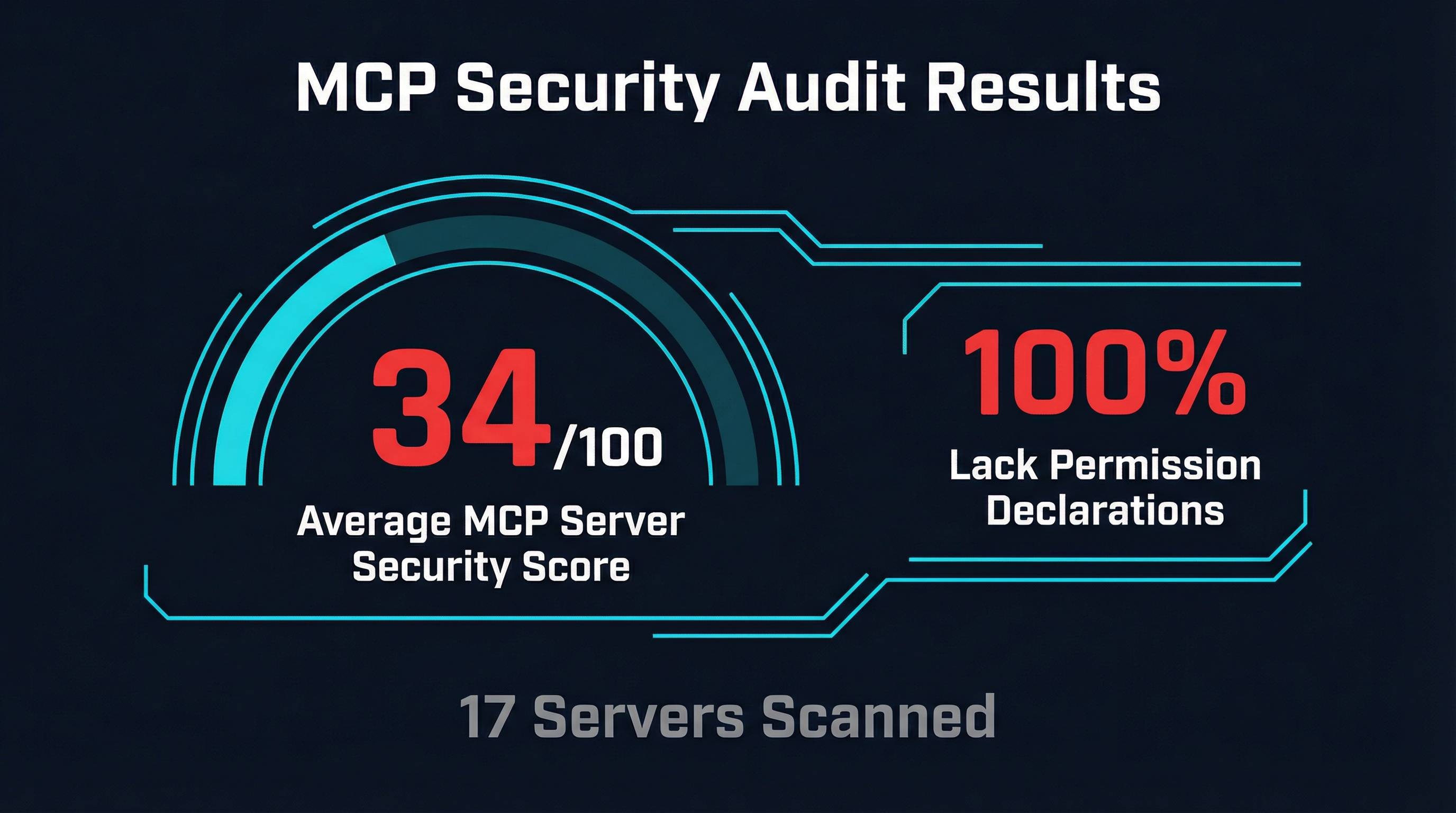
A recent security audit of 17 popular MCP servers — including official implementations from Anthropic, AWS, Cloudflare, Docker, and Azure — produced results that should alarm anyone deploying MCP in production. The headline findings:
- 100% of servers lacked proper permission declarations
- Average security score: 34 out of 100
- 29% rated high risk (5 of 17 servers)
- 1 confirmed code injection vulnerability (eval() in Playwright MCP)
The audit, conducted using AgentShield across 4,198 files and 1.2 million lines of code, applied 31 security rules covering privilege escalation, credential exposure, unrestricted network requests, and environment variable leaks. Cloudflare and AWS server repositories scored -100, the lowest possible rating. The highest-scoring servers were Docker-based implementations at 97/100 — and they achieved that score precisely because container isolation enforces boundaries that application code alone does not.
These numbers reflect a fundamental gap in the MCP ecosystem. The protocol itself has no permission model. There is no standard way for an MCP server to declare what resources it needs, what network access it requires, or what filesystem paths it will touch. Every server operates with the full permissions of its host process. Every tool call is an implicit trust decision that the agent — and the user behind it — may not even be aware of.
This is not a theoretical concern. The OWASP MCP Top 10, published in early 2026, codifies the threat model: tool poisoning, data exfiltration, privilege escalation, and supply chain attacks are all active attack vectors. And in January 2026, NIST published a Request for Information specifically addressing security considerations for AI agents — a clear signal that regulatory frameworks for tool-using AI systems are on the way.
The question is no longer whether MCP deployments need security infrastructure. The question is what that infrastructure should look like.
The Emerging Security Tooling Stack
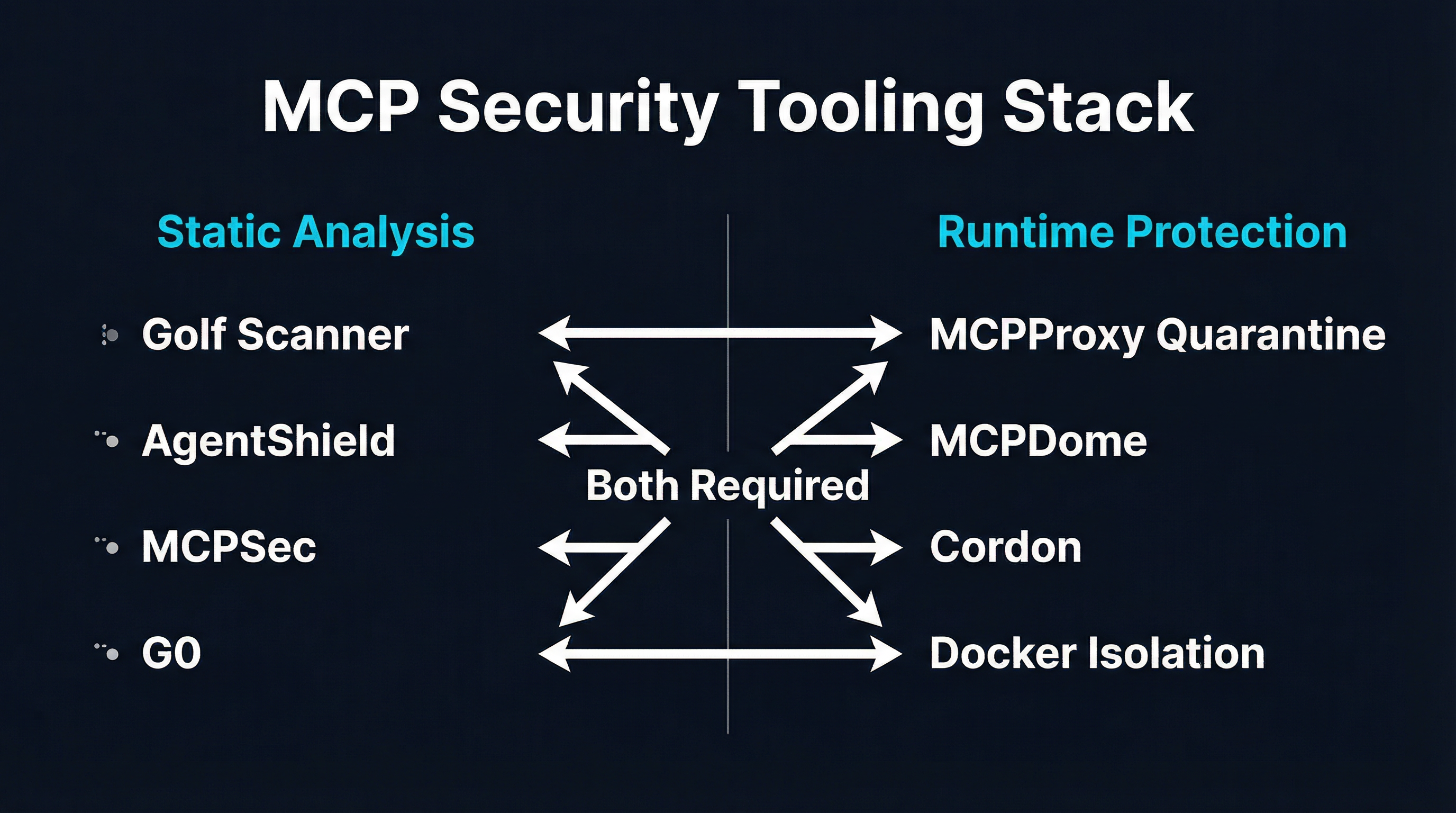
The MCP security tooling landscape is splitting into two complementary categories: static analysis tools that scan servers before deployment, and runtime protection systems that enforce boundaries during operation. You need both.
Static Analysis: Catching Problems Before Deployment
Golf Scanner is a Go-based CLI that discovers MCP server configurations across seven IDEs (Claude Code, Cursor, VS Code, Windsurf, Gemini CLI, Kiro, and Antigravity) and runs 20 security checks against each one. Nine checks work offline — command safety, credential exposure, file permissions, container isolation settings. Eleven require network access to query vulnerability databases including OSV, GitHub, npm, PyPI, and OCI registries. Each server receives a 0-100 risk score with severity-weighted scoring and safety caps for critical findings. It ships as a single statically-compiled binary, sends no telemetry, and can run entirely offline.
AgentShield is the scanner behind the 17-server audit mentioned above. It applies 31 security rules with cross-file taint tracking across TypeScript, JavaScript, Python, Go, and Rust codebases. Where Golf Scanner focuses on configuration and supply chain risks, AgentShield performs deeper code-level analysis — tracing data flows to detect hardcoded credentials, phone-home patterns, and injection vulnerabilities.
Both tools share a critical limitation: they analyze code at rest. They cannot detect runtime behavior — a server that behaves differently based on environment variables, dynamically loads malicious code, or modifies its tool descriptions after initial registration. Static analysis tells you what a server could do based on its source code. It cannot tell you what a server will do in production.
Runtime Protection: Enforcing Boundaries During Operation
MCPDome is a Rust-based security proxy that intercepts every JSON-RPC message between agents and MCP servers. It enforces a default-deny policy engine with Argon2id-hashed authentication, time-window access controls, and token-bucket rate limiting at global, per-identity, and per-tool levels. Its standout feature is schema pinning — computing SHA-256 hashes of tool definitions and blocking any server that modifies its schemas after initial registration. This directly counters tool poisoning attacks where a server initially presents benign descriptions and later swaps in malicious instructions. MCPDome also performs Unicode normalization (NFKC) and homoglyph transliteration to detect injection attempts that use lookalike characters to bypass naive string matching.
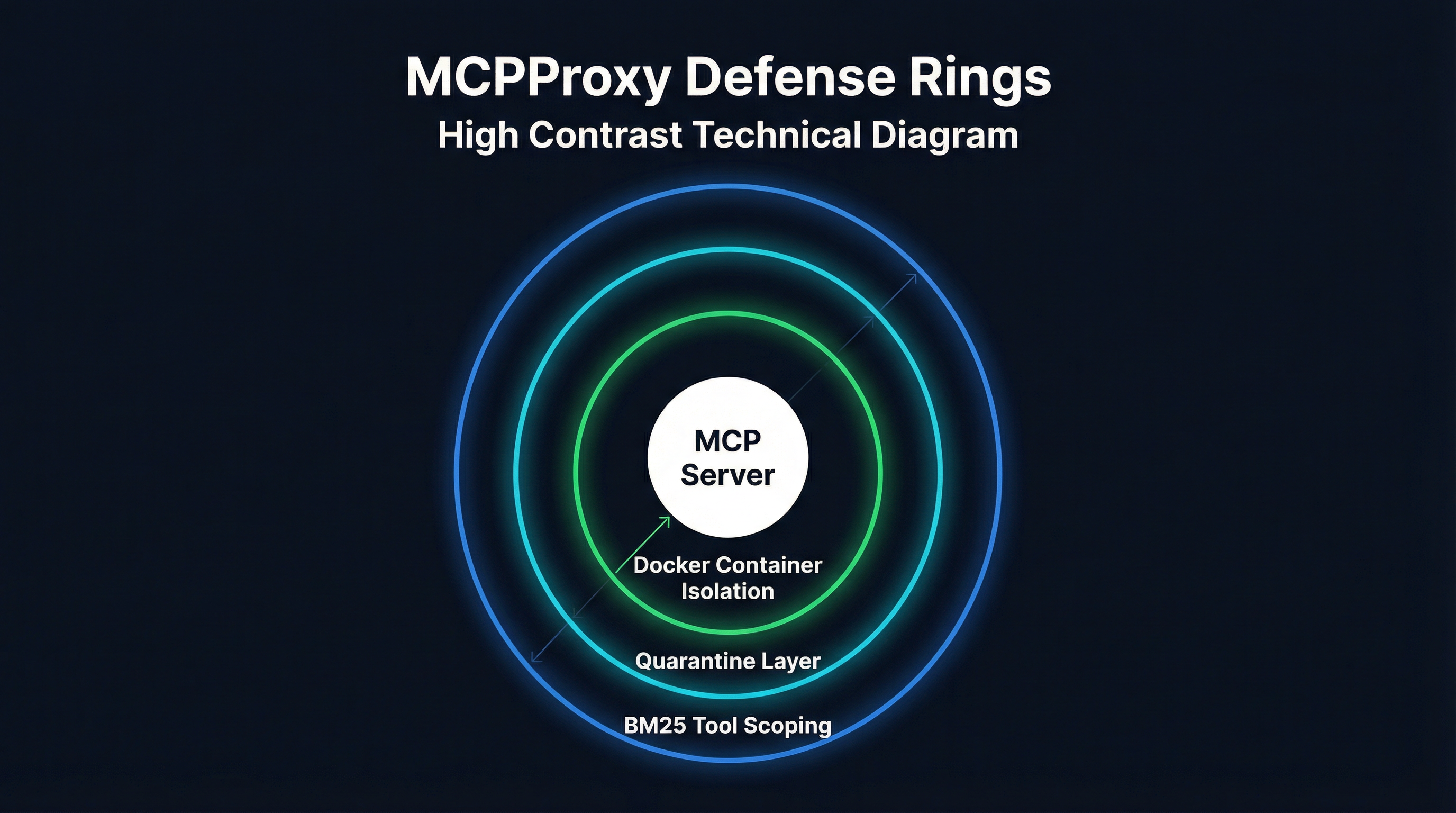
MCPProxy takes a different architectural approach. Rather than inspecting messages on the wire, MCPProxy operates at three layers: BM25 tool discovery limits the attack surface by controlling which tools reach the agent, quarantine isolates untrusted server schemas for analysis before they enter the tool pool, and Docker container isolation enforces OS-level resource boundaries on the servers themselves.
These are not competing approaches. MCPDome’s wire-level inspection catches threats that slip past schema analysis. MCPProxy’s container isolation catches threats that operate outside the JSON-RPC channel. A mature MCP deployment benefits from both static scanning before deployment and runtime protection during operation.
MCPProxy’s Three-Ring Defense
MCPProxy’s security architecture is built as concentric defense rings, each addressing a different threat category.
Ring 1: BM25 Tool Scoping Reduces Attack Surface
The outermost defense is tool scoping. When an agent connects to MCPProxy with 15 MCP servers exposing 200+ tools, the BM25 engine scores all tools against the current request and presents only the top-K most relevant ones. This is primarily a usability feature — agents make better tool selections from focused lists — but it has a direct security benefit: tools that are not visible to the agent cannot be invoked.
If a compromised MCP server registers a tool designed to exfiltrate data, that tool only reaches the agent when the BM25 scoring determines it is relevant to the current query. For most requests, it will not be. This does not eliminate the threat, but it reduces the window of exposure from “always available” to “relevant-query-only.”
Ring 2: Quarantine Catches Poisoned Schemas
When a new MCP server connects to MCPProxy, its tool definitions enter quarantine. The quarantine system analyzes each tool’s name, description, and parameter schema for known attack patterns:
- Hidden instructions embedded in tool descriptions that attempt to override agent behavior
- Parameter schemas that request unnecessary permissions or sensitive data
- Description patterns that mimic legitimate system prompts
- Sensitive data markers in tool responses (API keys, credentials, PII patterns)
Suspicious tools are flagged for manual review. Only explicitly approved tools are released to the agent’s available tool pool. This creates an intake control that most gateways lack — they assume you have already vetted your servers, while MCPProxy makes vetting part of the connection workflow.
Ring 3: Docker Container Isolation Enforces OS-Level Boundaries
The innermost ring wraps each MCP server in a Docker container with restricted capabilities:
- Filesystem isolation: servers can only access explicitly mounted paths
- Network restrictions: outbound network access can be disabled or limited to specific hosts
- Resource limits: CPU and memory caps prevent runaway processes
- No privileged access: containers run without elevated permissions
This matters because the 17-server audit found that privilege escalation risks existed across 15 of the 17 servers scanned. Without container isolation, a compromised MCP server inherits the full permissions of its host process — file access, network access, environment variables, everything. Docker isolation ensures that even if a server is compromised, the blast radius is contained to its sandbox.
What the NIST RFI Means for MCP Gateways
In January 2026, NIST published a Request for Information on security considerations for AI agents. While the RFI is still in the comment phase, its existence signals where regulatory requirements are heading. Several themes are directly relevant to MCP gateway design:
Tool authorization and least privilege. The RFI asks how AI agents should be constrained in their tool usage and what authorization models are appropriate. This maps directly to MCP gateway capabilities: BM25 tool scoping (MCPProxy), default-deny policies (MCPDome), and RBAC/ABAC controls (Kong, Traefik). Gateways that can demonstrate least-privilege tool access will be better positioned when formal requirements emerge.
Audit and accountability. The RFI emphasizes the need for tamper-evident logging of agent actions. MCPDome’s hash-chained NDJSON audit logs are the most mature implementation of this today. MCPProxy logs tool calls through its web UI but does not yet produce cryptographically verifiable audit trails — this is a gap we are addressing.
Sandboxing and isolation. The RFI asks about mechanisms for containing agent behavior. Docker container isolation (MCPProxy, Docker MCP Gateway) and Kubernetes namespace isolation (IBM ContextForge) are current implementations. The regulatory direction is clear: production agent deployments will need demonstrable isolation boundaries.
Supply chain integrity. The RFI raises questions about trust in third-party tools and integrations. Static scanners (Golf Scanner, AgentShield) and runtime verification (MCPDome’s schema pinning, MCPProxy’s quarantine) address different facets of this. No single tool covers the full supply chain today.
The MCP community is also actively discussing protocol-level feedback mechanisms that would allow LLMs to report on tool usability and detect “tool squatting” attacks where malicious servers mimic legitimate tool names. These protocol-level features, combined with gateway-level enforcement, will form the next generation of MCP security infrastructure.
Securing Your MCP Deployment with MCPProxy in 15 Minutes
Here is a practical walkthrough for adding MCPProxy’s security layers to an existing MCP setup. This assumes you have one or more MCP servers configured in your Claude Code or Cursor environment.
Step 1: Install MCPProxy (1 minute)
# Install via Go
go install github.com/smart-mcp-proxy/mcpproxy-go/cmd/mcpproxy@latest

# Or download a binary from GitHub releases
# https://github.com/smart-mcp-proxy/mcpproxy-go/releases
Step 2: Add Your MCP Servers (2 minutes)
# Add servers — new servers are quarantined by default
mcpproxy upstream add filesystem -- npx -y @modelcontextprotocol/server-filesystem /home/user/projects
mcpproxy upstream add github -- npx -y @modelcontextprotocol/server-github --env GITHUB_TOKEN=${GITHUB_TOKEN}

# Or import from an existing Claude Code / Cursor config
mcpproxy upstream import ~/.config/claude/claude_desktop_config.json

# Verify servers are registered
mcpproxy upstream list
Step 3: Approve Quarantined Tools (1 minute)
New servers are quarantined by default. On first connection, MCPProxy holds all tool definitions for review:
# Start MCPProxy
mcpproxy serve

# Open the web UI to review quarantined tools
# Navigate to the Quarantine tab
# Review each tool's name, description, and parameters
# Approve trusted tools, reject suspicious ones
mcpproxy upstream approve filesystem
Step 4: Enable Docker Isolation (5 minutes)
For servers that should run in sandboxed containers:
{
  "mcpServers": {
    "filesystem": {
      "command": "npx",
      "args": ["-y", "@modelcontextprotocol/server-filesystem", "/data"],
      "quarantine": true,
      "docker": {
        "enabled": true,
        "image": "node:22-slim",
        "mounts": ["/home/user/projects:/data:ro"],
        "network": "none",
        "memory": "256m",
        "cpus": "0.5"
      }
    }
  }
}
Key isolation settings:
mounts: Only explicitly listed paths are accessible. Use:rofor read-only access.network: "none": Disables all outbound network access. Use"bridge"if the server needs internet.memoryandcpus: Prevent resource exhaustion from runaway servers.
Step 5: Configure BM25 Tool Scoping (2 minutes)
BM25 discovery is enabled by default. Configure the number of tools exposed per request:
{
  "discovery": {
    "enabled": true,
    "topK": 5,
    "algorithm": "bm25"
  }
}
With topK: 5, the agent sees only the 5 most relevant tools per request instead of the full catalog. Adjust based on your use case — complex workflows may need topK: 10, while focused agents work well with topK: 3.
Step 6: Connect Your Agent (2 minutes)
Point your AI editor to MCPProxy instead of connecting to MCP servers directly:
// Claude Code / Cursor MCP config
{
  "mcpServers": {
    "mcpproxy": {
      "command": "mcpproxy",
      "args": ["serve", "--stdio"]
    }
  }
}
MCPProxy now sits between your agent and all configured MCP servers, enforcing quarantine, container isolation, and BM25 scoping on every tool call.
Step 7: Run a Static Scan (2 minutes)
Complement MCPProxy’s runtime protection with a static scan using Golf Scanner:
# Install Golf Scanner
curl -fsSL https://github.com/golf-mcp/golf-scanner/releases/latest/download/golf-scanner-$(uname -s)-$(uname -m) -o golf-scanner
chmod +x golf-scanner

# Scan all MCP servers configured in your IDE
./golf-scanner scan

# Review the risk scores and address any high-severity findings
What Every MCP Gateway Needs
Based on the audit data, the emerging tooling stack, and the regulatory direction from NIST, here is what a production-ready MCP gateway must provide in 2026:
-
Intake controls. Tool schemas must be verified before they reach the agent. Quarantine (MCPProxy), schema pinning (MCPDome), or manual approval — pick at least one.
-
Runtime isolation. MCP servers must not run with the full permissions of their host. Docker containers, Kubernetes namespaces, or OS-level sandboxing provide the necessary boundaries.
-
Least-privilege tool access. Agents should not see every tool from every server. BM25 scoping, RBAC policies, or static allowlists reduce the attack surface.
-
Audit logging. Every tool call, every approval decision, every policy violation must be logged. Tamper-evident logs will become a regulatory requirement.
-
Supply chain scanning. Static analysis of MCP server code and configurations catches vulnerabilities that runtime controls cannot detect.
The security score of 34/100 across mainstream MCP servers is not going to improve overnight. The protocol does not enforce permissions, the ecosystem moves fast, and new servers appear daily. The gateway layer is where security has to be enforced, because it is the only chokepoint between the agent and the tools.
MCPProxy addresses intake controls, runtime isolation, and least-privilege access today. We are adding tamper-evident audit logging and deeper supply chain integration in Q2 2026. The goal is a single binary that covers all five requirements — security infrastructure that is as easy to deploy as the MCP servers it protects.
MCPProxy is open source at github.com/smart-mcp-proxy/mcpproxy-go. Try it with mcpproxy serve, or read the gateway landscape comparison for context on where MCPProxy fits in the broader market.