 MCPProxy
Why Docker Isolation for MCP Servers Isn't Optional — Lessons from 66 Zombie Containers
TL;DR
Claude Code silently orphans Docker containers running MCP servers — one developer found 66 zombies on his laptop. The community fix is to ditch Docker entirely and use uvx or npx instead. That solves the cleanup problem but removes the only security boundary between MCP servers and your host machine. Given that a recent audit of 17 popular MCP servers found 100% lack permission declarations and real code injection vulnerabilities exist in the wild, abandoning container isolation is the wrong response. The right response is Docker done properly — with SIGINT propagation, automatic cleanup, resource limits, and network isolation. That is exactly what MCPProxy does.
66 Zombie Containers and the Wrong Lesson
Robert Gambee at FutureSearch recently documented a problem that anyone running Docker-based MCP servers with Claude Code has likely encountered: zombie containers silently accumulating on the host machine.
The mechanics are straightforward. When Claude Code spawns an MCP server via docker run, the Docker CLI process acts as a proxy between the AI client and the container. When Claude Code exits, it closes the stdin pipe to the docker run process. The docker run process terminates. But the container keeps running — because closing stdin is not a signal. Unlike pressing Ctrl+C, which sends SIGINT and triggers a graceful shutdown, Claude Code’s exit gives the Docker daemon no indication that the container should stop.
The --rm flag does not help. It only removes containers after they stop, and these containers never stop. They sit there consuming CPU, memory, and ports, invisible unless you run docker ps and notice the growing list.
Gambee found 66 of them on his laptop.
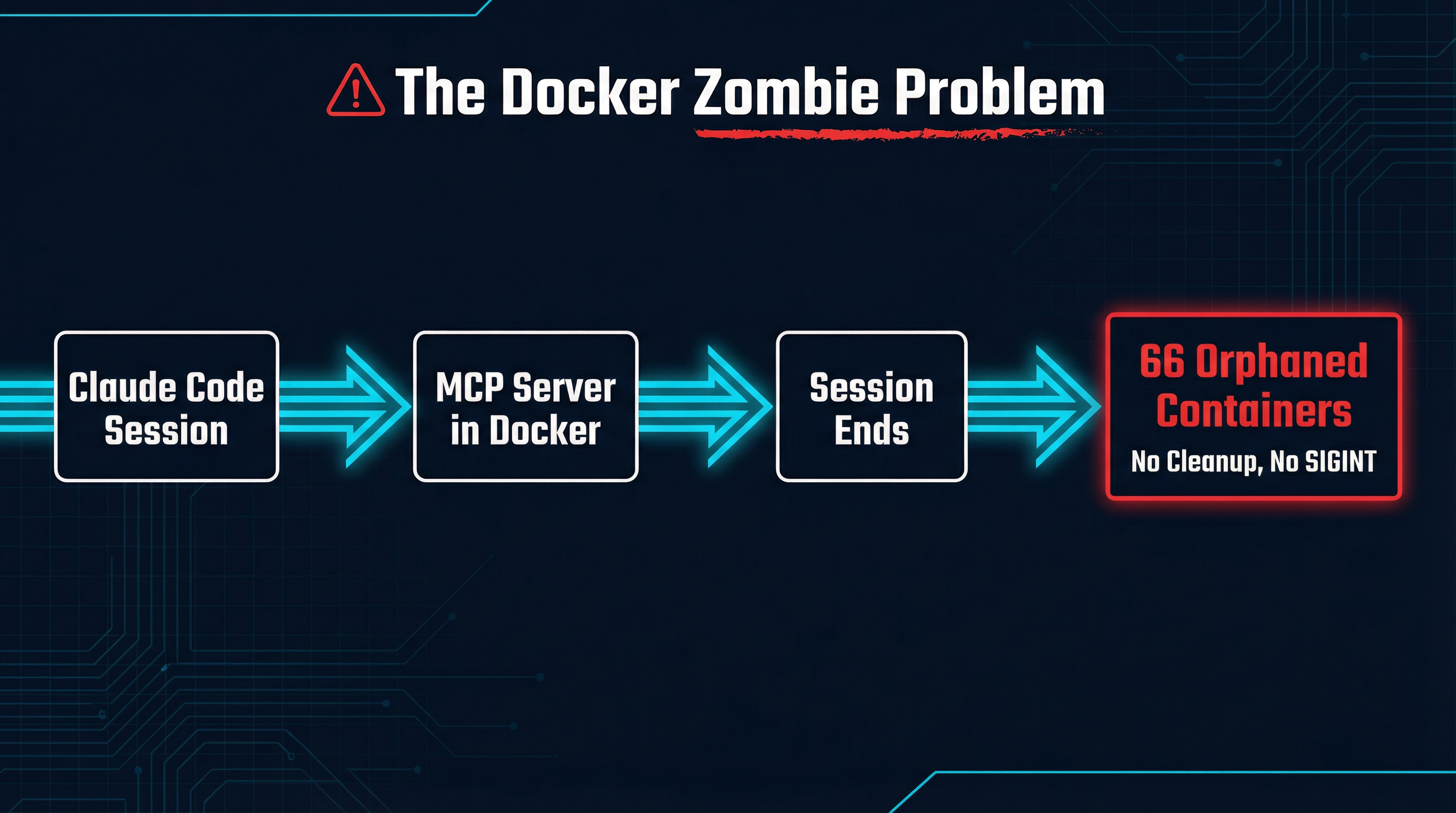
His solution, and the one gaining traction in the community, is to replace Docker-based MCP servers with direct package manager invocations — uvx for Python servers, npx for Node servers. These run as normal child processes that get properly cleaned up when the parent exits. Problem solved.
Except the problem was never “Docker is bad.” The problem was “nobody managed Docker’s lifecycle properly.” And the fix — removing Docker entirely — trades a real operational annoyance for a much bigger security gap.
The Security Landscape Is Worse Than You Think
If you are running MCP servers without container isolation, you should know what you are exposing your machine to. A security audit of 17 popular MCP servers — including official implementations from Anthropic, AWS, Cloudflare, Docker, Brave, and Azure — paints a grim picture:
- 100% of servers lack proper permission declarations. There is no programmatic way to verify what capabilities a server requests before installation. You install it and trust it completely, or you do not install it at all.
- 29% scored as high risk on the security assessment (5 out of 17).
- The average security score was 34 out of 100. For context, both the Cloudflare and AWS MCP repositories scored -100 on their scale.
- Real code injection vulnerabilities exist. The Playwright MCP server contains an
eval()call that accepts dynamic user input, allowing arbitrary JavaScript execution through the AI agent. This is not a theoretical attack — it is a function call away from code execution on your machine.
Beyond the audit findings, the structural problem is clear: MCP servers are granted broad access to sensitive systems. Filesystem servers read and write your files. Kubernetes servers manage your clusters. Database servers execute queries. Git servers access your repositories. Every one of these is a potential lateral movement vector if compromised.
When you run these servers via uvx or npx, they execute as your user, with your permissions, on your network, with access to your filesystem. A compromised or malicious MCP server has everything it needs to exfiltrate data, install persistence mechanisms, or pivot to other systems on your network.
When you run them in Docker with proper configuration, they get none of that by default. The container is an isolation boundary. It has its own filesystem, its own network namespace, its own resource limits. A compromised server inside a container is a problem. A compromised server running as your user with full host access is a catastrophe.
How Docker Goes Wrong (and How to Fix It)
The zombie container problem is real, and it is a symptom of a deeper issue: most MCP tooling treats Docker as a transparent wrapper rather than an isolation mechanism that requires lifecycle management. Here is what goes wrong and what proper management looks like.
The stdin problem
When Claude Code exits, it closes the stdin pipe. The docker run CLI process sees EOF on stdin and terminates. But docker run is just a client — the container is managed by the Docker daemon, which is a separate process. The daemon has no idea the client is gone. The container keeps running.
The fix requires active lifecycle management. The process supervising the container must:
- Trap its own shutdown signals (SIGINT, SIGTERM)
- Explicitly send stop signals to the container via the Docker API
- Wait for graceful shutdown with a timeout
- Force-kill the container if it does not stop
- Remove the container on exit
This is not complicated, but it does require someone to actually implement it. Claude Code does not. Most MCP hosting tools do not. MCPProxy does.
Resource limits are not optional
A Docker container without resource limits is just a namespace — it can still consume all available CPU, memory, and disk I/O on the host. This matters because MCP servers are running code you did not write, responding to prompts you did not fully control, on your development machine.
Proper container configuration includes:
- Memory limits:
--memory 512mprevents a single server from consuming all available RAM - CPU limits:
--cpus 1.0prevents CPU starvation of other processes - PID limits:
--pids-limit 100prevents fork bombs - Read-only filesystem:
--read-onlywith explicit tmpfs mounts where needed
Network isolation matters
By default, Docker containers share the host’s network stack if launched with --network host, or get a bridged network with outbound access. For MCP servers, neither default is ideal.
Most MCP servers need to reach specific external services — a database, an API, a cloud provider. They do not need to scan your local network, access other containers, or reach arbitrary endpoints. Proper network configuration means:
- Creating isolated Docker networks per server or server group
- Explicitly exposing only the ports needed for MCP communication
- Blocking access to the host network and other containers by default
How MCPProxy Handles This
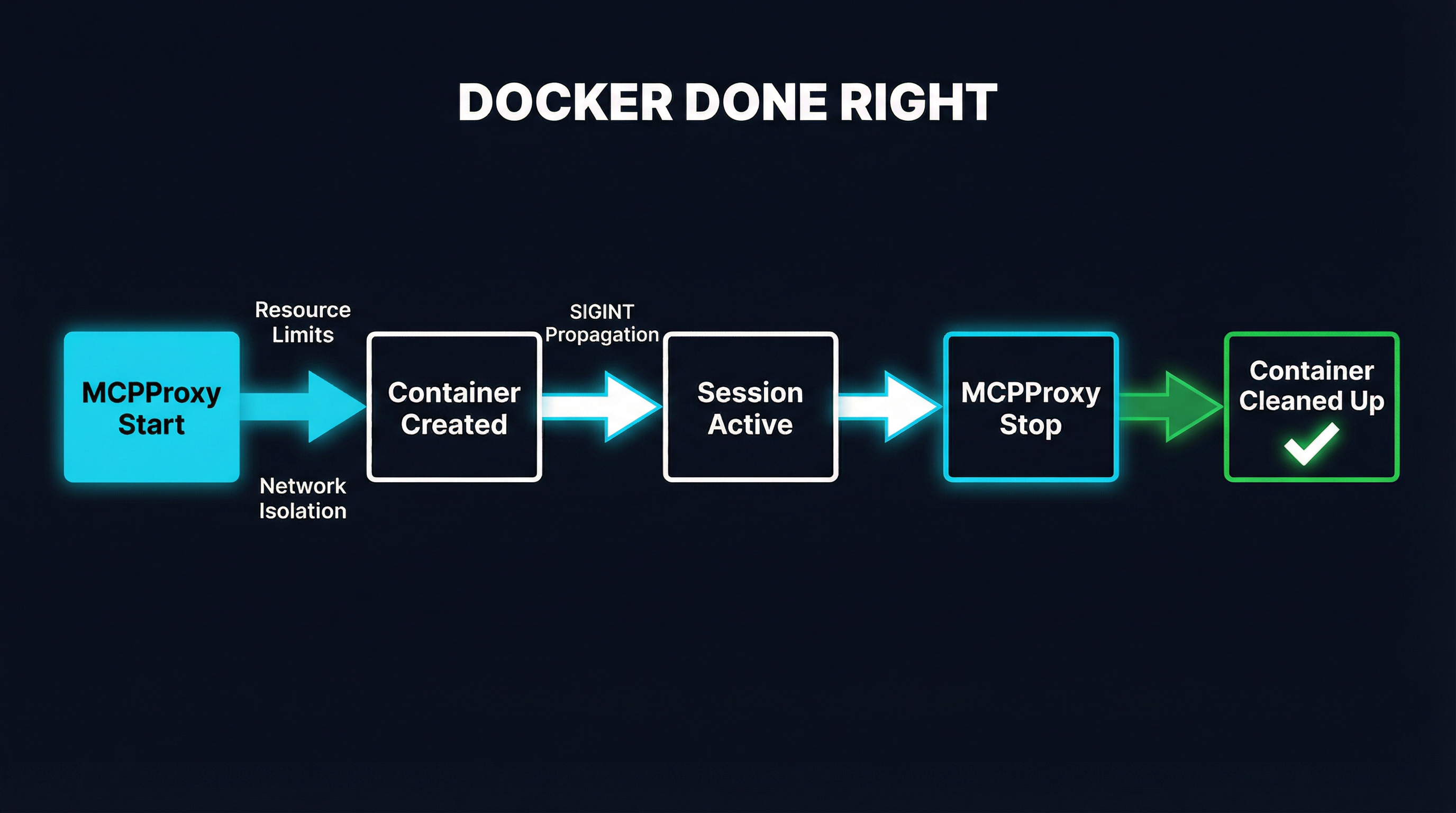
MCPProxy treats Docker containers as first-class managed resources, not fire-and-forget subprocesses. Here is the concrete lifecycle:
Container creation includes resource limits, network isolation, and security options by default. You configure these per-server in your MCPProxy config, and they are enforced every time the container starts. No hoping that someone remembered the right docker run flags.
During the session, MCPProxy maintains a direct connection to each container through the Docker API — not through the docker run CLI process. This means MCPProxy always knows the container’s state and can communicate with it regardless of what happens to stdin/stdout pipes.
On shutdown, MCPProxy sends SIGINT to the container’s main process, waits for graceful shutdown (configurable timeout), then force-stops and removes the container if needed. This happens whether MCPProxy exits normally, receives SIGINT itself, or encounters an error. The cleanup is deterministic.
On crash recovery, MCPProxy checks for orphaned containers from previous sessions on startup and cleans them up. Even in the worst case — a power failure, a kernel panic, an OOM kill — containers are reconciled on the next start.
The result: zero zombie containers. Not because Docker was removed, but because someone actually managed the lifecycle.
The Real Tradeoff
The community framing of this issue is “Docker is broken for MCP, use uvx/npx instead.” The actual tradeoff is different:
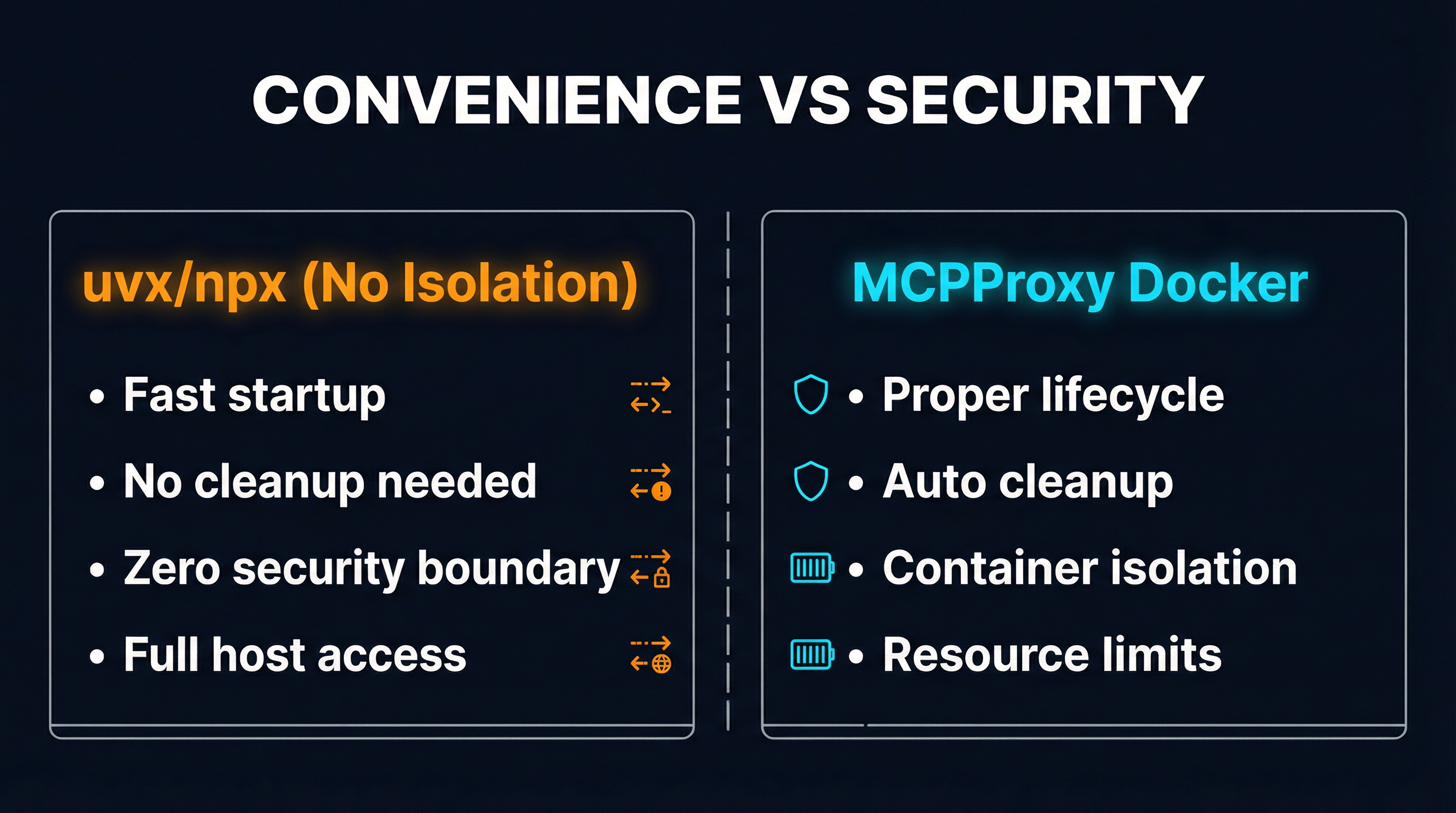
uvx/npx (no isolation):
- Fast startup, no container overhead
- Clean process cleanup when the parent exits
- Zero security boundary between the MCP server and your host
- Full access to your filesystem, network, and credentials
- A compromised server owns your machine
Docker with proper lifecycle management:
- Slightly slower startup (sub-second with cached images)
- Deterministic cleanup via container API
- Full container isolation — filesystem, network, PID namespace
- Configurable resource limits prevent resource exhaustion
- A compromised server owns a container, not your machine
For local development with trusted, well-known MCP servers — say, Anthropic’s own filesystem server — running via uvx is a reasonable choice. The attack surface is low, the convenience is real, and the risk is manageable.
For anything resembling production use — shared development environments, CI/CD pipelines, multi-tenant setups, or any scenario involving third-party MCP servers — running without isolation is negligent. The MCP ecosystem is young. Servers are unaudited. Permission declarations do not exist. The eval() in Playwright is not an anomaly; it is a preview of what happens when a fast-growing ecosystem ships features before security.
What the Ecosystem Needs
The Docker zombie problem exposed a real gap in MCP tooling, and the community is right to be frustrated. But the answer is not less isolation — it is better tooling for isolation.
Projects like MicroMCP are exploring microservice architectures for MCP with per-service isolation and gateway-level policy enforcement. MCPProxy has shipped production-grade Docker lifecycle management since day one. The MCP specification itself needs to evolve to include permission declarations so that users can make informed decisions about what they are granting access to.
What we need is an ecosystem where Docker isolation is the default, not an afterthought. Where mcpproxy upstream add postgres-mcp gives you a properly isolated, resource-limited, lifecycle-managed container without requiring you to be a Docker expert. Where the convenience of uvx and the security of containers are not in opposition.
We are not there yet. But abandoning Docker because the current tooling manages it poorly is exactly backwards. The 66 zombie containers are not an argument against Docker isolation. They are an argument for doing Docker right.
MCPProxy is an open-source MCP gateway with built-in Docker lifecycle management, BM25 tool discovery, and quarantine-based security. Try it at mcpproxy.app.