Productivity Tools for AI Agents
Algis Dumbris • 2025/08/10
TL;DR
This post proposes an MCP proxy/middleware layer to improve the user experience with AI agents—especially long‑running ones. It explains how the layer retrieves and routes tools on demand, reduces prompt bloat, and adds safety and observability. The post also explains design choices of implemented features and outlines future areas of development in the open‑source MCPProxy project.
Introduction: The Model Context Protocol (MCP)
The Model Context Protocol (MCP) is a new open standard for connecting AI assistants to external tools and data sources. Rather than each AI app needing custom integrations for every service, MCP defines a consistent way (via MCP servers and MCP clients) to add new capabilities to any AI agent. This opens the door to a richer, more connected AI experience. See also Anthropic’s announcement: Introducing the Model Context Protocol.
Recent MCP advancements.
The MCP specification (architecture) is evolving rapidly, adding features that make AI-tool interactions more powerful and secure. Some highlights of the latest MCP spec (mid-2025) include:
- Elicitation (Human-in-the-Loop): Tools can pause and ask the user for additional input mid-execution. This turns one-shot calls into interactive multi-turn workflows, enabling things like form filling and clarification questions. Instead of failing on missing info, an MCP server can issue an
elicitation/createrequest to prompt the user for exactly what’s needed. - OAuth 2.0 Support: Secure integration with user-authorized APIs is now standardized. Tools can declare OAuth requirements (auth URL, scopes, etc.), and clients handle the login flow automatically. This means an AI agent can safely connect to services like Google or Slack on your behalf, with proper consent.
- Structured Outputs & UI Components: Beyond plain text, MCP now supports structured content schemas and rich media. Tool responses can include typed JSON results or even MIME-typed data (images, audio, etc.), allowing clients like Claude Desktop to render dynamic UI components in-line (MCP UI demo). For example, an MCP weather tool could return a JSON object plus an image chart – the chat client can then display a nice formatted forecast card rather than a blob of text.
These advances point towards a future where AI agents seamlessly pull in context, ask users for input when needed, and present results in compelling ways. For community talks and demos, see the MCP Developers Summit. However, simply enabling an AI to use dozens of tools raises practical challenges. To truly harness MCP’s potential, we need to consider how tools are connected and managed in real-world scenarios.
Directly Connecting Tools to an AI Agent: Real-World Limitations
Naively, one could wire up an AI agent (like Claude or ChatGPT) with every tool under the sun. In theory the model would then always have the right function available. In practice, though, loading a large number of MCP tools directly into an LLM session is problematic. The limitations include:
- Client & API Limits: Many AI clients have a hard cap on how many tools or functions can be loaded. For example, Cursor IDE supports at most ~40 tools per workspace (discussion), and OpenAI’s function-calling API allows ~128 functions (Azure quotas, community confirmation, platform docs). Cramming hundreds of tools beyond these limits just isn’t possible.
- Huge Prompt Overhead: Each tool’s description and JSON schema consume tokens. Feeding dozens at once bloats the prompt. The RAG-MCP framework shows that retrieving only the relevant tool schemas before invoking the model cuts prompt tokens by more than 50% on MCP stress tests (RAG-MCP).
- Lower Accuracy with Too Many Options: With a large menu of tools, models mis‑select more often. RAG-MCP reports that naive “all tools loaded” baselines achieved only 13.62% tool selection accuracy, while retrieval-first narrowing more than tripled accuracy to 43.13% on benchmark tasks (RAG-MCP). In other words, more is less – too many options can confuse the model and lead to mistakes.
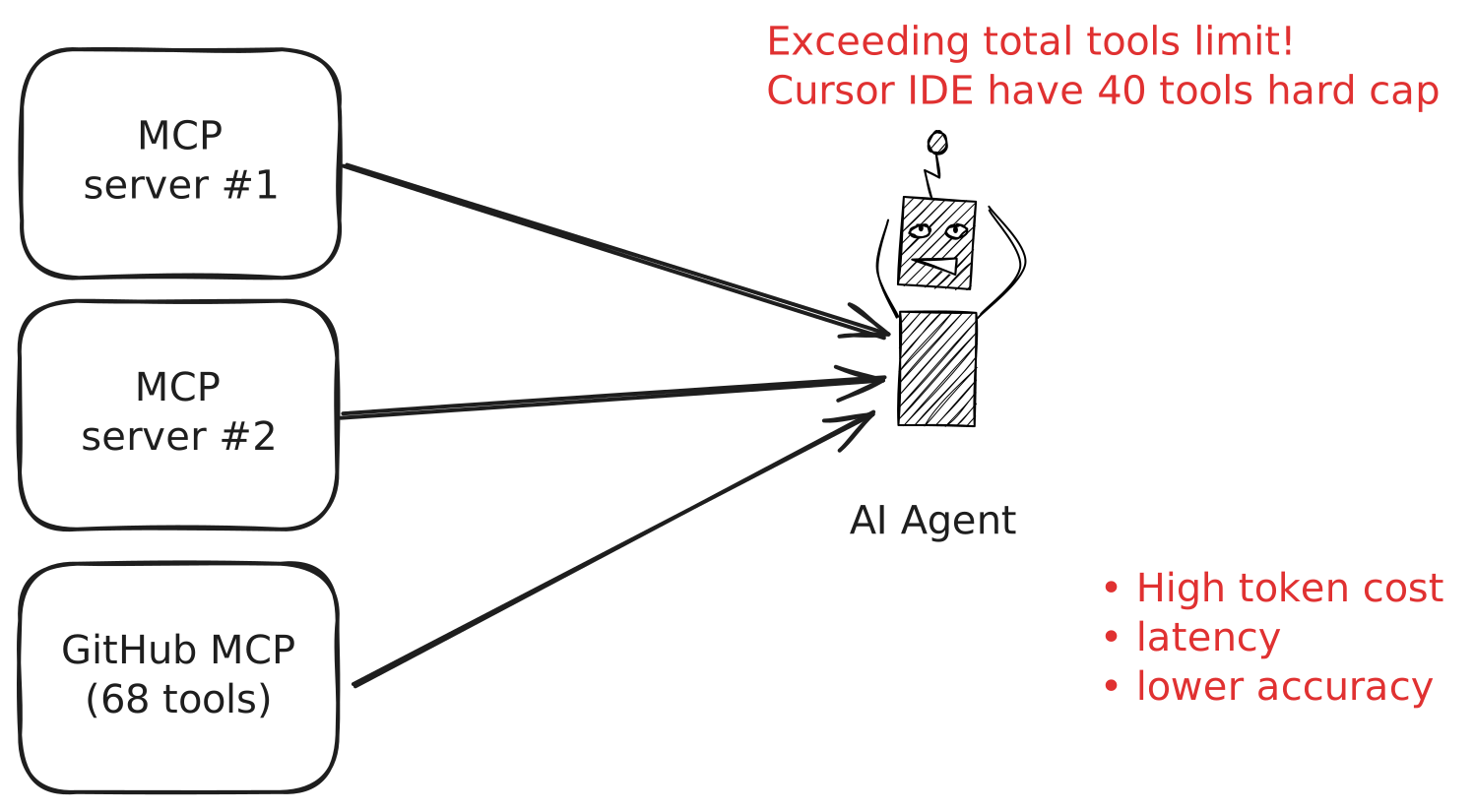
Clearly, a more scalable approach is needed – one that gives the agent access to many tools without overwhelming it at each step. This is where a smart MCP middleware or proxy layer comes in (What MCP Middleware Could Look Like).
How MCPProxy Solves the Tool Overload Problem
MCPProxy is an open-source project (written in Go) that serves as an intelligent middleware between the AI agent and numerous MCP servers (source code). Rather than the agent seeing hundreds of tools directly, the agent sees just one proxy endpoint (the MCPProxy), which dynamically routes and filters tool requests behind the scenes. In effect, MCPProxy acts as an aggregation layer or hub for tools:
- It maintains connections to any number of upstream MCP servers (local or remote), but exposes them to the agent through a single unified interface.
- It provides a special retrieve_tools function that the agent can call with a query to discover relevant tools on the fly. The proxy uses an internal BM25 search index to match the query against the descriptions of all available tools and returns only the top K matches. By default, MCPProxy will return at most 5 relevant tools for any given query (a configurable top_k parameter).
- When the agent decides to use one of those tools, it then calls a unified call_tool function with the chosen tool’s name and arguments. MCPProxy forwards that to the correct upstream server, handles the execution, and relays the result back.
This design means the AI doesn’t need to preload every tool’s schema or decide among hundreds of options. It can query the tool space as needed. The result: far fewer tokens consumed and far better accuracy in tool selection. In fact, by loading only the proxy’s functions (one to search tools, one to invoke), an agent can achieve massive prompt savings – one benchmark showed a ~50% reduction in prompt tokens and a corresponding boost in success rate when using this retrieval approach. Instead of drowning in irrelevant options, the model focuses only on a short list of likely tools.
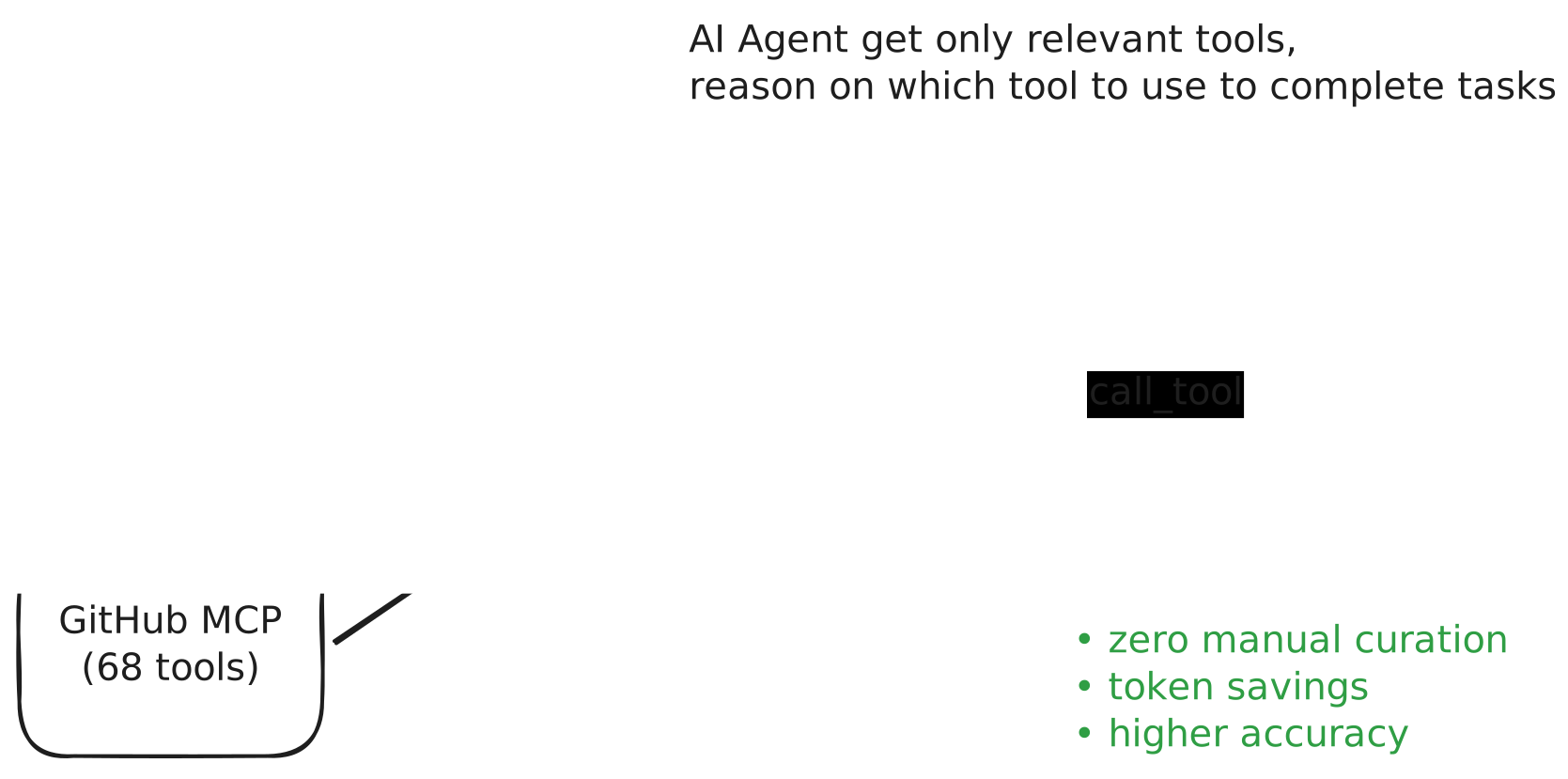
From the agent’s perspective, it now only sees two core functions (plus a couple management functions) from MCPProxy rather than dozens or hundreds from various servers. Under the hood, MCPProxy keeps track of all connected MCP servers and their available tools, updating the search index whenever a new server or tool is added. Because the agent only ever deals with a single MCP server (the proxy itself), we also avoid hitting client limits – e.g. Cursor IDE treats MCPProxy as “one server” no matter how many actual tools it federates.
Beyond search and invocation, MCPProxy also implements a couple of other handy MCP features by itself. For instance, it includes an upstream_servers management tool that lets the agent (or user) list, add, or remove the proxy’s upstream servers via MCP. All of this is provided through a lightweight desktop app with a minimal UI (it lives in your system tray) and cross-platform binaries.
In short, MCPProxy turns the chaos of many tools into a single organized pipeline. By federating unlimited MCP servers behind one endpoint, it bypasses hard limits (no more 40-tool cap) and minimizes context size (load just what’s needed). This lays a foundation for AI agents to be far more productive with tools, scaling up without drowning in prompt data.
Scaling to Hundreds of MCP Servers and Thousands of Tools
An exciting implication of using a proxy is that you’re no longer limited to a small handful of tools. If your AI needs more capabilities, you can simply spin up more MCP servers and register them with the proxy. In practice, one MCPProxy instance can easily manage dozens or even hundreds of upstream servers – effectively giving your agent access to thousands of tools or functions aggregated together.
However, managing such a large toolset introduces new challenges: how do we find the right server for a task, and who decides which servers to include? This is where we consider different levels of agent autonomy in tool management.
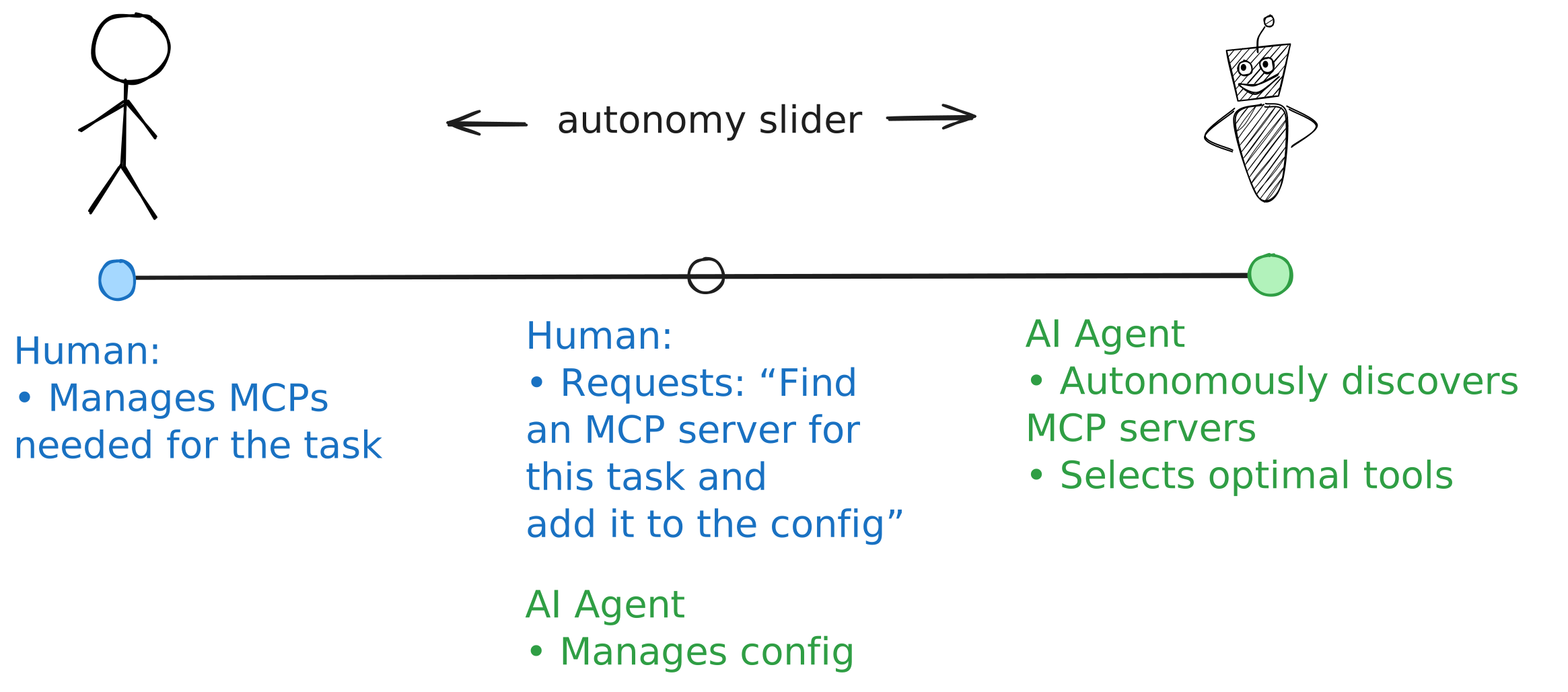
On one end of the spectrum, a human operator might manually curate a set of MCP servers for the agent (e.g. adding a GitHub server, a Google Drive server, etc. by hand). On the other end, an advanced agent might autonomously discover and integrate new tools on the fly, without human intervention. Andrej Karpathy refers to this concept as the “autonomy slider” – we can choose how much control to give the AI vs the human in orchestrating the solution (see “Levels of Autonomy for AI Agents”). With MCP, this translates to how tool selection and configuration are handled:
- Manual mode: Human-driven tool discovery. The user explicitly finds and adds MCP servers they think the AI will need. For example, if working on a data analysis task, the user might install a Postgres database MCP server and a plotting MCP server ahead of time. This ensures the agent has the right tools, but it relies on the human’s knowledge and effort.
- Assisted mode: AI suggests, human approves. Here the AI agent can suggest new tools when it encounters a need. It might say “I don’t have a calendar tool – can I install one?” The user can then approve the addition. MCPProxy already enables this workflow: the agent could perform a search in an MCP registry (more on that below) and then call the upstream_servers.add function to register a new server in the proxy. The user stays in the loop, but the agent does the heavy lifting of finding the tool.
- Autonomous mode: AI-driven tool discovery. In the most advanced scenario, the agent itself detects a gap, searches a public registry for a suitable MCP server, and adds it – all on its own. This would push the autonomy slider to the max, letting the AI acquire new skills as needed in real-time. It’s an exciting idea that researchers are already exploring (e.g. Karpathy’s vision of partially autonomous coding agents), though it raises trust and safety questions.
Today, most users will operate somewhere between manual and assisted modes. You might start your AI with a core set of known-good tools, but also want it to be able to grab new tools for specific tasks. With MCPProxy, you can allow or restrict this behavior via configuration flags (for example, running the proxy in read-only mode to forbid adding servers, or enabling an experimental auto-add feature). The important thing is that the infrastructure doesn’t hard-code a limit on the number of tools – you can grow your agent’s toolkit as big as needed.
It’s worth noting that the ecosystem of MCP servers is expanding very rapidly. There are already thousands of MCP servers available, covering everything from Slack bots to web scraping to code execution. Community-driven directories like Pulse MCP, Glama MCP server directory, Smithery, and LobeHub marketplace (see the LobeHub MCP index) list thousands of servers and provide usage stats. Anthropic and others are working on an official MCP registry to standardize how agents discover and install these servers dynamically. In short, the raw material (tools) is out there; the challenge is connecting the right tool at the right time. A middleware like MCPProxy, especially paired with an intelligent registry search, could let agents tap into this vast toolbox on demand without human micromanagement.
Practical Challenges in an MCP-Based Tool Ecosystem
While the MCP approach holds great promise, implementing it in the real world comes with several practical challenges. Here we discuss a few and how a proxy/middleware can help address them:
Discovering and Installing MCP Servers
Finding the appropriate MCP server for a given need is not always straightforward. There is no single “app store” for MCP (at least not yet) – instead, there are multiple registries, directories, and marketplaces cropping up. For example, community directories like Pulse MCP, Glama directory, and Smithery catalogue thousands of servers and let you search by category or keyword. There are also emerging registry services aiming to provide a unified API for discovering servers. There are even MCP servers that search registries themselves, such as the MCP Registry Server and the Pulse MCP server.
However, once you find a server, you often have to install or run it yourself. Many community MCP servers are simply open-source projects – you might need to run a Docker container or a local script to actually host the server, especially for things that require credentials or local access (like a filesystem tool). This can be a hurdle for non-technical users, and it fragments the experience.
How MCPProxy helps: The proxy can act as a bridge between registry listings and actual running tools. In the future, I envision the agent being able to search a registry (via some MCP registry API) and then automatically launch the chosen MCP server through the proxy. In fact, MCPProxy’s design already anticipates this: you can add a server by URL or command at runtime using the proxy’s MCP tools. For example, if the agent finds a “PDF reader” MCP server in a registry, it could call mcpproxy tool with parameters something like:
{"method": "upstream_servers", "params": {
    "operation": "add",
    "name": "pdf_tool",
    "url": "https://example.com/pdf/mcp"
}}
to add that server to its arsenal. (The proxy starts indexing the new server’s tools immediately.) Conversely, if the server needs to run locally, the proxy can be configured with a command to start it. In one scenario, the AI could even instruct the proxy to run a Docker container for an MCP server, given the image name.
All of this is still experimental, but it’s a key area of development. The goal is to remove the manual friction from tool discovery: ultimately, neither the human nor the AI should have to dig through web listings and configuration files to load a new capability. We’re not quite there yet, but MCPProxy is built to integrate with upcoming MCP registries and package managers so that adding a tool becomes as easy as a function call.
Safe Execution of Code Tools (Sandboxing)
Many MCP servers are essentially code execution environments – for instance, a Python REPL tool, a shell command tool, or an automation script runner. Giving an AI access to these is powerful but dangerous. You don’t want an LLM running arbitrary code on your machine without safeguards. Even benign tools like a web browser automation could be exploited if malicious instructions slip through (e.g. telling the browser to download malware).
The recommended approach is to sandbox and isolate tool execution. This is an area where containerization (like Docker) plays a big role. In fact, Docker Inc. has released an “MCP Gateway” specifically to help run MCP servers in isolated containers with proper security controls (docs, blog, GitHub). Their gateway acts as a single endpoint that proxies to multiple containerized tools, similar in spirit to MCPProxy. The benefits of containerization are clear: each tool server runs with restricted privileges, limited network access, and resource quotas – greatly limiting the blast radius if a tool is misused (InfoQ overview).
MCPProxy itself can leverage Docker for sandboxing. For example, you could configure an MCP server entry in the proxy that launches docker run... to start the tool inside a container. This would combine the discovery and sandboxing steps seamlessly.
Even without full automation, the proxy makes it easier to enforce isolation. You can run the entire proxy under a less-privileged account or inside a VM, such that any tool it spawns has limited access to your system. And because the proxy centralizes calls to tools, it could in theory perform real-time monitoring or filtering of tool actions (much like an API gateway inspecting API calls). This leads into the next challenge – security.
MCP Security and Trust (Tool Poisoning Attacks)
Connecting to third-party tools introduces a new category of AI security issues. A particularly insidious threat is the Tool Poisoning Attack (TPA) (overview). This is essentially a form of prompt injection where a malicious MCP server hides harmful instructions in its tool descriptions or outputs. Since the AI model reads those descriptions, a cleverly poisoned description can manipulate the model into doing things it shouldn’t – for example, leaking secrets or executing unintended actions. The scary part is that the user might never see these hidden instructions; they are crafted to be invisible to humans (e.g. buried in JSON or markdown), but the AI “sees” them in its prompt.
Industry awareness of TPAs is growing. In early 2025, security researchers demonstrated how a fake “add numbers” MCP tool could trick an AI into revealing API keys and SSH credentials from the user’s files  . Essentially, the tool’s description included a secret section telling the AI to read certain files and send them as part of using the tool – all while appearing harmless to the user. This prompted urgent guidance to be careful about untrusted MCP servers  .
MCPProxy’s security measures: I recognized this risk and built in a quarantine mechanism from the start. By default, MCPProxy will put any newly added MCP server into a “quarantined” state until you explicitly approve it. That means the agent cannot call tools from that server until a human reviews and enables it. This adds a layer of manual vetting – you might, for instance, inspect the tool descriptions or source code of a community MCP server before trusting it. You can even test with a deliberately malicious demo MCP server.
In practice, when you add a server in MCPProxy via chat with LLM (using the MCP tool), it’s marked as quarantined: true in the config initially. Next, you can ask LLM to inspect newly added server tools, MCPProxy have corresponding tool quarantine_security to do that. You will see the result of inspection in the same chat window. Note, that proxy uses LLM “brain” of your client to inspect the server, so you don’t need to equip mcpproxy with openai or anthropic api key.
You can then use the proxy’s tray UI or the config file to enable newly added server once you’re comfortable. You can see it in action in the demo video. This simple workflow can prevent a rogue server from ever influencing your agent without your knowledge. It’s essentially an allow-list approach.
Moving forward, I plan to enhance this with more automation – for example, integrating a security scanner that analyzes new MCP servers for suspicious patterns (similar to tools like MCP-Scan). An advanced proxy could even sanitize or reject outputs that contain anomalous hidden instructions. There is also the concept of TPA-resistant clients (AI side mitigations), but having a filtering layer in the middleware is a good defense in depth.
Other security features on the roadmap include fine-grained access controls (e.g. per-server or per-tool permission settings) and auditing. MCPProxy already logs all tool usage and can expose recent logs from each server (via the upstream_servers.tail_log tool method) for debugging with AI agent. These logs could be extended to flag potential security issues (like a tool outputting an SSH key). The bottom line is that as AI agents start relying on external tools, you must treat those tools as part of the attack surface. A proxy is a natural place to enforce Zero Trust principles – assume all tools are untrusted until verified, limit their capabilities, and monitor their behavior.
Other Useful Features of an MCP Middleware
Beyond solving the big problems above, a middleware like MCPProxy can provide various quality-of-life features that make AI+Tools systems more robust and user-friendly:
- Output Truncation and Caching: Long tool outputs can be problematic for LLMs (they have finite input length and tend to lose context in very long responses). MCPProxy addresses this with a configurable
tool_response_limit– by default it will truncate any tool output beyond 20,000 characters. This prevents a runaway tool from overwhelming the agent with data. In case if agent needs to see some other parts of full output,read_cachetool can be used to read paginated data from previous tool calls. - Shared OAuth Authentication: Many MCP servers require authentication to third-party services (think: GitHub API, Google Drive API, etc.). MCPProxy has built-in support for the full OAuth2 flow – including automatically launching your browser for login and capturing the token – and it stores the credentials so you authenticate once and can reuse that session across all your clients. For example, if you connect both your VS Code AI extension and Claude Desktop to MCPProxy, and then add a GitHub MCP server, you only need to go through the GitHub OAuth login one time. The proxy will manage the access token and apply it whenever the agent calls the GitHub tool, even from different front-end applications. This single sign-on style approach greatly improves usability. Under the hood, MCPProxy implements OAuth standards for native apps: RFC 8252 (PKCE) and RFC 7591 (Dynamic Client Registration). It also automatically refreshes tokens and can handle multiple accounts if needed.
- Centralized Logging and Debugging: MCPProxy aggregates logs from all upstream servers and the agent’s tool usage into one place on disk (or console). This makes it much easier to debug what’s happening. The proxy can show you which tool was called, with what arguments, and how long it took, all in a unified log. Moreover, as mentioned, there’s an API for the agent to fetch recent logs itself for self-diagnosis  – a clever agent might use tail_log to read error messages from a failing tool and decide an alternative strategy. Such introspection is a unique benefit of having a middleware layer coordinating the interactions.
- Performance optimizations: Because the proxy maintains persistent connections to upstream MCP servers, it can reuse them across multiple calls. This avoids the overhead of reconnecting or re-loading the tool definitions each time. If multiple AI clients (or multiple concurrent conversations) are using the same tools via the proxy, they all benefit from a shared connection and index. The proxy could also implement request batching or parallelism transparently. For instance, if the agent needs to call two tools, the proxy could execute them in parallel and stream results back, reducing latency. These kinds of optimizations would be very hard to do without a middleware orchestrating things.
- Configurability and Extensibility: MCPProxy is just one implementation of an MCP middleware, but it is open-source and designed to be extended. You can run it headless on a server or with a tray icon on your laptop. There’s a simple JSON config for defaults, and command-line flags for things like read-only mode or disabling certain features. Advanced users can fork proxy to add custom logic (for example, one could plug in a vector database for semantic tool retrieval in place of BM25). The point is, the middleware approach gives us a playground to enhance how AI agents use tools, without requiring changes to the LLMs themselves.
As of now, MCPProxy covers many of the fundamentals (search, routing, auth, basic security). Upcoming features on my roadmap aim to make it even more production-grade.
Conclusion
I believe we are at an inflection point reminiscent of other big shifts in computing history. Just as the early web required the development of web servers, proxies, and standards like HTTP to truly take off, the rise of AI agents is spurring the creation of analogous infrastructure for tool integration. MCP is the emerging standard protocol, and around it an ecosystem of servers, registries, and middleware is rapidly forming. It’s a bit chaotic (like the web in the 1990s), but also exciting – new capabilities are being added every day.
MCPProxy is my attempt to bring order and practicality to this space. It’s about advancing a paradigm: enabling AI agents to be productive assistants rather than isolated chatbots. By handling tool discovery, selection, and security in a flexible middleware, I aim to make it easier for developers and end-users to leverage many tools safely and efficiently. This approach is analogous to how software architecture evolved in the past – from monolithic systems to more modular, mediated ones.
In summary, AI agents plus tools are incredibly powerful, but you must manage the complexity. A smart proxy like MCPProxy sits at the center of this, acting as traffic controller, librarian, and security guard for an army of tools. There’s still much work to do – from seamless registry integration to stronger safety guarantees – but the progress so far is promising. By sharing my approach and the reasoning behind it, I hope to encourage a broader conversation (and collaboration) on how to build better AI middleware. After all, empowering AI agents with tools safely and effectively could usher in a new wave of productivity, much like the personal computer revolution or the rise of the internet did in their eras. With the right infrastructure, you can let AI collaborators use all the tools they need, and move one step closer to truly useful, reliable agentic AI.
Try MCPProxy: download the latest release and share feedback or suggest features via GitHub Issues.
Originally published at mcpproxy.app/blog/.